Configure the run (Settings)
Open the Settings drawer (gear icon) to control the environment a session replays in. Settings are per-session and apply on the next Play/Record:
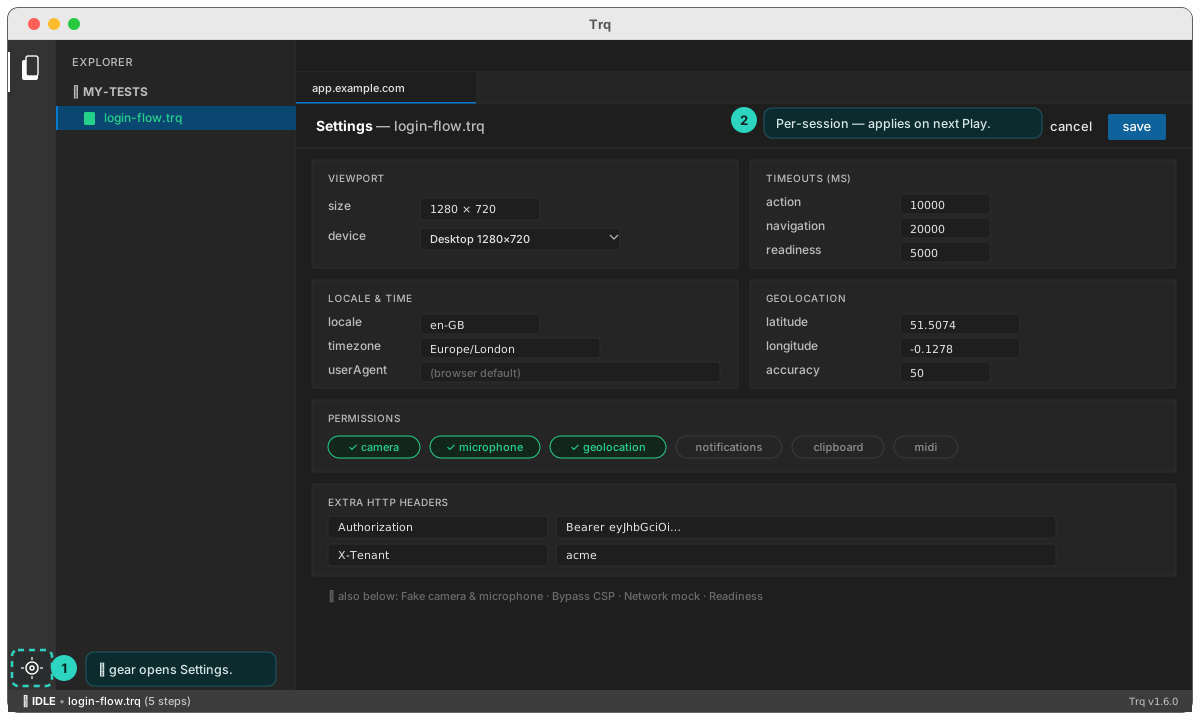
- Viewport / device — width × height + mobile flag, with presets (Desktop 1280×720, Desktop 1920×1080, iPhone 14 Pro, iPad).
- Timeouts — action (element resolve, default 10000 ms), navigation (default 20000 ms), assertion retry budget (default 5000 ms), condition ("run only if" guard window, default 2000 ms — see Conditional steps).
- Locale & time —
locale(e.g.en-GB),timezone(e.g.Europe/London), customuserAgent. - Geolocation — latitude / longitude / accuracy, injected into the page. (There's no real GPS in the embedded browser — location comes only from here.)
- Permissions — grant camera, microphone, geolocation (shown granted by default), notifications, clipboard, MIDI, and more.
- Extra HTTP headers — sent on every request (e.g.
Authorization: Bearer …,X-Tenant: acme). - Fake camera & microphone — override
getUserMediawith a fake device (off by default). Enable it, then + Add video / + Add audio to feed any browser-playable file (mp4/webm/mp3/wav); with no file it serves a synthetic test card / tone. Ideal for video-call and camera-capture flows. - Bypass CSP — disable Content-Security-Policy for the run.
- Network mock — capture/serve API responses. See Network mock.
- Readiness — wait-before-action page state. See Reliability & waits.