Search sessions
Press ⌘⇧F (Ctrl⇧F on Windows and Linux), or click the search field in the middle of the toolbar, and start typing. Results appear as you type.
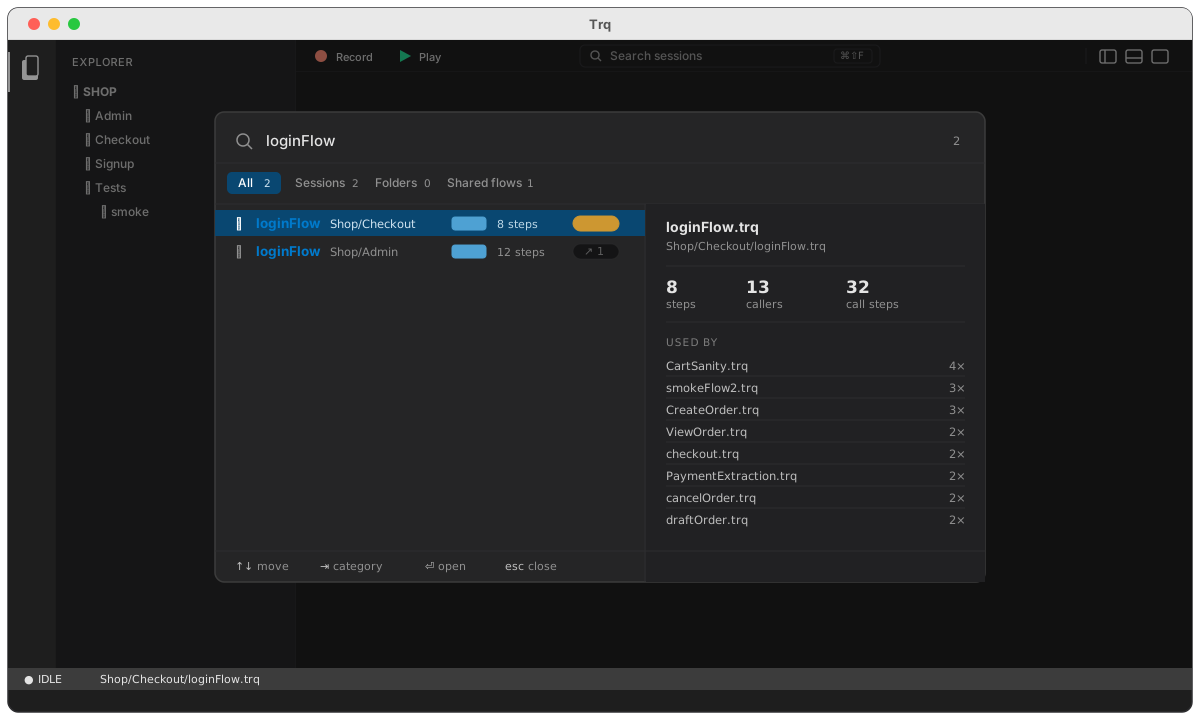
Search works the same in web, mobile and API sessions — it's a project-wide index, not a per-target one, and a mobile session that a web journey calls shows up with that caller listed.
What it searches
Names only — session filenames, folder names, and suites. It does not search inside your steps: not URLs, not request names, not assertion text. That keeps every keystroke instant no matter how large the project gets.
Matching is fuzzy, so you type a sketch of the name rather than a prefix:
| You type | It finds | Why |
|---|---|---|
login | loginFlow.trq | the obvious case |
cro | CreateOrder.trq | the capitals, as an acronym |
sclog | Shop/Checkout/loginFlow.trq | letters from the folders and the name |
bg2496 | BG-2496-secondAttemptPay.trq | ticket numbers work as well as words |
The matched letters are highlighted in each result, so it's clear why something matched.
Filename matches always rank above folder-only matches — typing merchant puts CreateMerchant.trq above everything merely sitting in a merchant/ folder.
Which tests depend on it
This is the part that isn't in a normal file search.
A .trq file is often a shared building block rather than a leaf test — a login flow that a dozen journeys call before doing anything else. Two files can even have the same name in different folders, one used everywhere and one barely at all. The filename alone can't tell them apart.
So every row carries a caller chip — ↗ 13 — counting the sessions that call it. It turns amber past five, marking the files where a careless edit has reach. And the preview pane on the right names them in full for whichever row you have selected:
- steps — how many steps the session itself holds
- callers — how many other sessions call it
- call steps — how many
▶ callrows they hold between them, which is not the same number: one session can call the same flow four times
A session nothing calls says so plainly — "Nothing calls this session. Editing, reordering or deleting it affects no other test." — which is exactly what you want to know before a rewrite.
The palette is useful before you type anything. With an empty query each tab shows its own default: Sessions leads with your most-depended-on flows — the ones whose names are hardest to remember and most costly to break — and Folders lists the fullest first, which is a quick way to see how a project is laid out.
Categories
Four tabs narrow the results, each showing its own count for the current query, so a result that isn't where you expected is one glance away rather than four clicks:
| Tab | What's in it | Empty query shows |
|---|---|---|
| All | everything that matched | most-depended-on first |
| Sessions | sessions and suites — the things you can run | most-depended-on first |
| Folders | folders only | the fullest folders first |
| Shared flows | matches that at least one other session calls | every shared flow |
With nothing typed there's nothing to match, so each count is a total — how many sessions, folders and shared flows the project holds.
Shared flows is the odd one out, and deliberately: it isn't a file type, it's the set of files other tests are built on. That's usually the set you want and least often remember the name of.
Press ⇥ to cycle tabs without leaving the keyboard.
Keys
| Key | Action |
|---|---|
⌘⇧F / Ctrl⇧F | Open search |
↑ ↓ | Move through results |
⇥ / ⇧⇥ | Next / previous category |
⏎ | Open the selected session |
Esc | Close |
Opening a result selects that session and reveals it in the File Explorer, expanding whatever folders it's nested in — and reopening the sidebar first if you had it hidden. Choosing a folder opens the first session inside it, which reveals the folder in the same way.
Staying current
The index is built the first time you open search and reused after that, so typing is instant. It rebuilds when anything changes it:
- sessions you create, rename, move or delete in Studio
- changes from outside Studio — a
git pull, a teammate's sync, an edit in another editor - switching to a different project
So a branch switch that adds forty tests is reflected the next time you open search. There's nothing to refresh by hand.
See also
- Flows — how one session calls another, and what the caller counts are counting
- Keyboard shortcuts — the rest of the Studio shortcuts
- Project layout — how sessions and folders are stored on disk