Reusable flows — extract, call, and see inside
Several journeys usually share the same chunk of work — a login, a form fill, an approval sequence. A flow is just a .trq session that another session calls as a single step: the ▶ call row runs every step of the referenced flow inline, with its own inputs, and reports what happened inside.
Extract a selection into a flow
You rarely write a sub-flow from scratch — you notice a run of steps worth reusing after recording. Extract selection to flow… turns it into one:
- Multi-select a contiguous run of steps (Cmd/Shift-click) in the Events tab.
- Right-click → "Extract selection to flow… (N steps)".
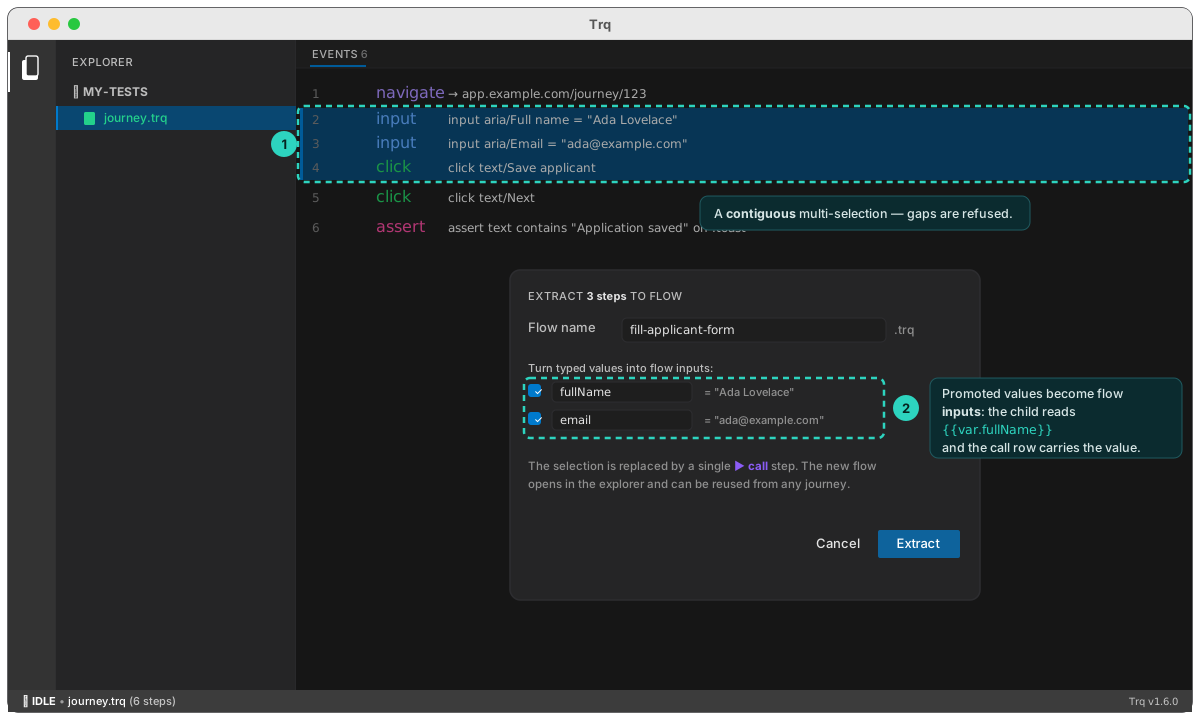
- Name the flow — it's created beside the current session (same folder).
- Promote typed values to inputs (optional) — Trq lists every literal you typed in the selected steps, with an input name suggested from the field's label. Checked values become flow inputs: the new flow reads
{{var.name}}, and the call row carries the actual value — so the same flow works with different data from different journeys.
Click Extract: the new .trq appears in the explorer, and the selection in your session collapses to a single ▶ call row.
before                                     after
2  input  Full name = "Ada Lovelace"       2  ▶ call fill-customer-form.trq · 2 in
3  input  Email = "ada@example.com"
4  click  Save customer
The extracted flow is a normal session — open it, edit it, replay it on its own, and call it from as many journeys as you like. Any conditions on the extracted steps come along unchanged.
Call a flow
To call an existing flow, right-click a row → Insert step above/below ▸ Call flow… (or + Add step → Call flow… for either end — see insert positions), pick the session, and fill its inputs. Inputs accept {{templates}} — pass {{var.x}}, {{uuid}}, or literals. Values come back out by reading them, with no mapping to declare.
Finding the flow
Once a project has more than a handful of flows, picking one out of a list of full paths stops working — every row starts with the same folder prefix and the filename is at the far end. The session field is a search box:
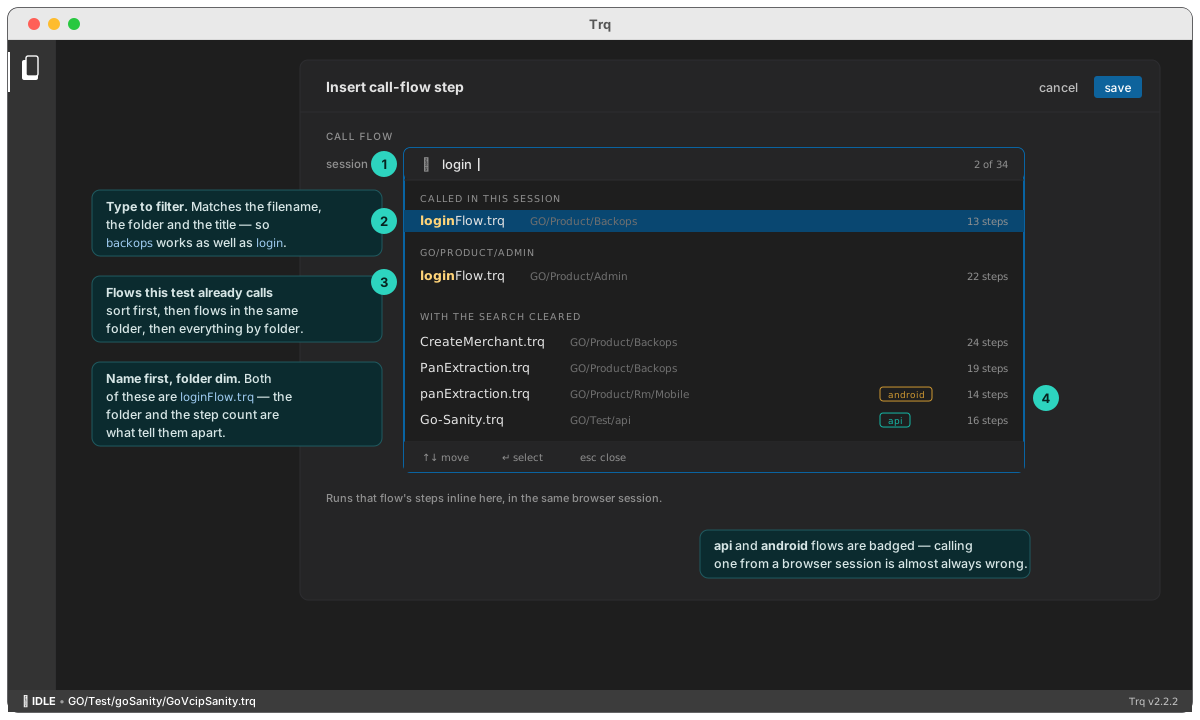
- Type to filter. Matching runs over the filename, the folder and the flow's title, so
backopsnarrows as usefully aslogin. The part that matched is highlighted. - The name leads, the folder follows dim. Both are shown because both are needed — a real project has more than one
loginFlow.trq, and the folder plus the step count is what tells them apart. - Two groups sort first: flows this session already calls, then flows in the same folder. Those two cover most picks.
apiandandroidflows are badged. Calling one from a browser session is almost always a mistake; previously it only showed up at replay.- Keyboard throughout — ↑↓ to move, ↵ to choose, esc to close. The field takes focus when it opens, so you can just type.
A flow never lists itself: a session cannot call itself.
Reading a flow's values
A called flow runs in its own variable scope — anything it captures (a capture step or an api-request extract) belongs to the child, not the caller. To use one of those values afterwards, read it:
{{flow.<alias>.<name>}}
There is nothing to declare. Every variable the flow set is readable the moment it finishes:
2  ▶ call login.trq            (called as "login")
3  api-request  GET  /me
        Authorization: Bearer {{flow.login.token}}
4  assert  text/Signed in as Ada   visible
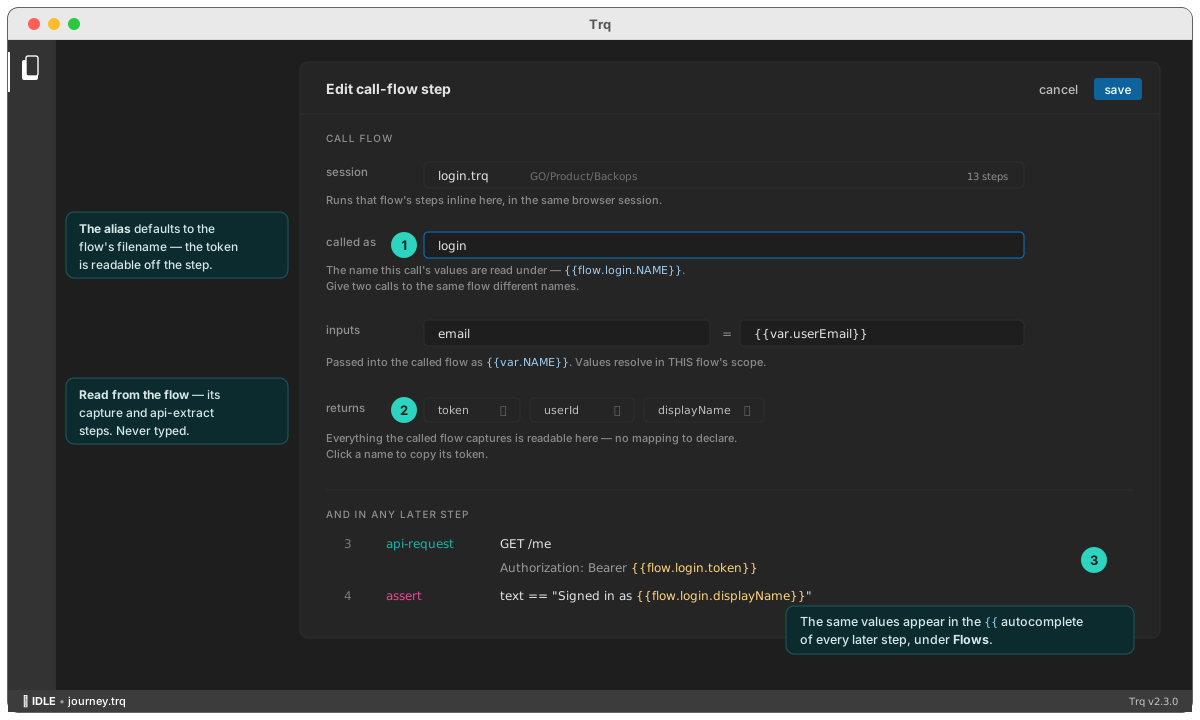
The alias is the name this call answers to. It defaults to the flow's filename and is shown as called as on the call row, so the token is something you read off the step rather than reconstruct. Change it when the default reads badly — and when one journey calls the same flow twice, give each call its own name so {{flow.…}} means one thing:
2  ▶ call labelForAssignment.trq   (called as "firstLabel")
…
9  ▶ call labelForAssignment.trq   (called as "secondLabel")
10 assert  text == {{flow.firstLabel.appId}}
You don't have to know the names. The editor lists what the flow returns — read from its own capture and api-extract steps — and each chip copies its full token. The same values appear in the {{ autocomplete of every later step, under Flows.
A few rules:
- Nothing is copied into the caller.
{{var.token}}does not see the child'stoken; only{{flow.<alias>.token}}does. That's what lets two flows both returntokenwithout either one shadowing a variable you already had. - Unresolved tokens stay visible. A wrong alias or a name the flow never set resolves to the literal
{{flow.x.y}}, so you see it in the step that used it instead of getting an empty string. - Everything is text — values are strings (JSON extracts are already stringified).
- A flow returns its own values, not its children's. If
a.trqcallsb.trq, thenb's values area's to read, not yours. Capture what you need at each level.
:::caution Replaces outputs
Before 2.3.0 a call row carried an outputs mapping that copied named child variables into the caller. It has been removed — it pointed the opposite way to the inputs editor beside it, needed a bare name where the other side took a template, and failed silently on a typo.
A session that still has one fails on that step with the exact replacement, e.g.
call-flow login.trq: "outputs" was removed. A called flow's values are now
read directly, with no mapping:
    {{var.sessionToken}}  →  {{flow.login.token}}
  Update those references, then clear this step's outputs.
If one journey called the same flow more than once, mind which call each reference meant: the old mapping was last-one-wins, so a reference picks up the nearest preceding call. Give those calls distinct aliases and point each reference at the right one. :::
A guarded call is a branch
Combine a call row with a condition and you have an if-branch without any block syntax — skipping the call skips everything inside it:
2  ▶ call premium-addons.trq   if text/Premium plan · visible
3  ▶ call basic-plan-note.trq  if NOT text/Premium plan · visible
4  click  text/Next
Exactly one of rows 2–3 runs; the other reports ⊘.
See inside the call
A call row isn't a black box — before a run or after one.
Click the purple ▸ on a call that hasn't run and its steps appear anyway, read straight from the flow file. They're dimmed, because they have no result yet, and the list is capped — double-click any of them to open the flow itself. A call whose flow is missing names the path it looked for instead of expanding to nothing, which is usually the first sign a file was renamed outside Trq.
After a run the same row shows an aggregate chip — the child outcome at a glance:
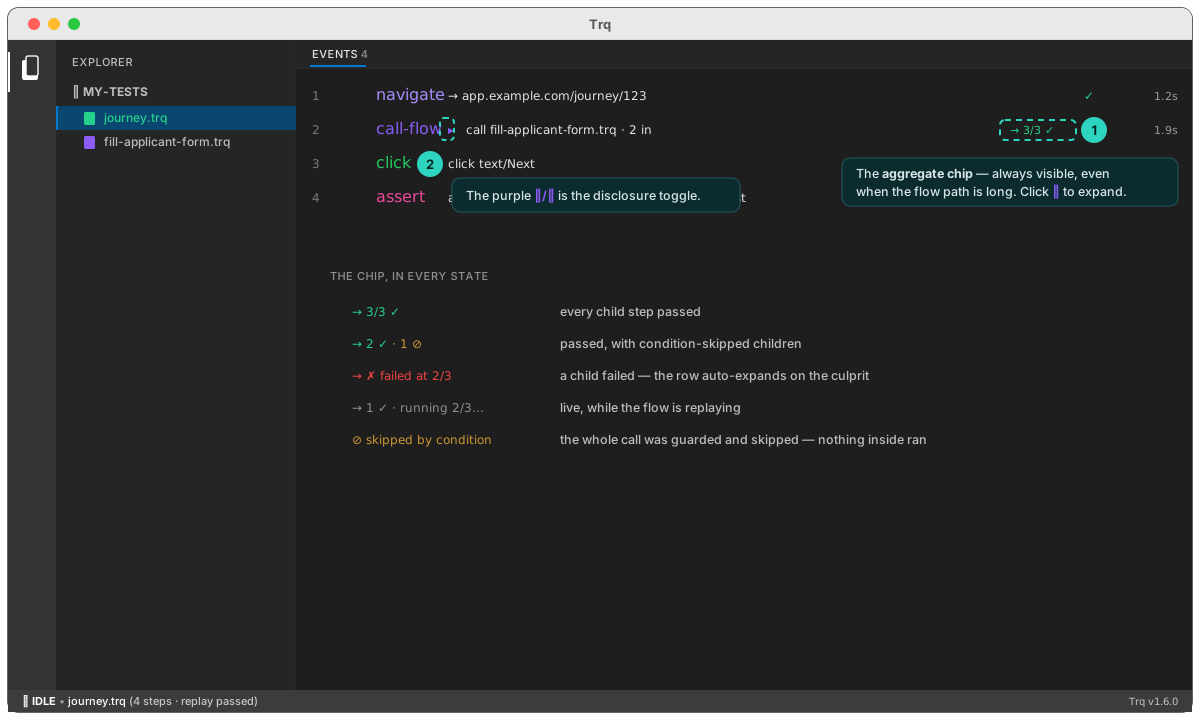
Click the purple ▸ to expand the child steps inline — each with its own status, duration, and skip/fail reason. While the flow is replaying, children stream in live; if a child fails, the row expands itself with the culprit highlighted, and the steps after it show as not run:
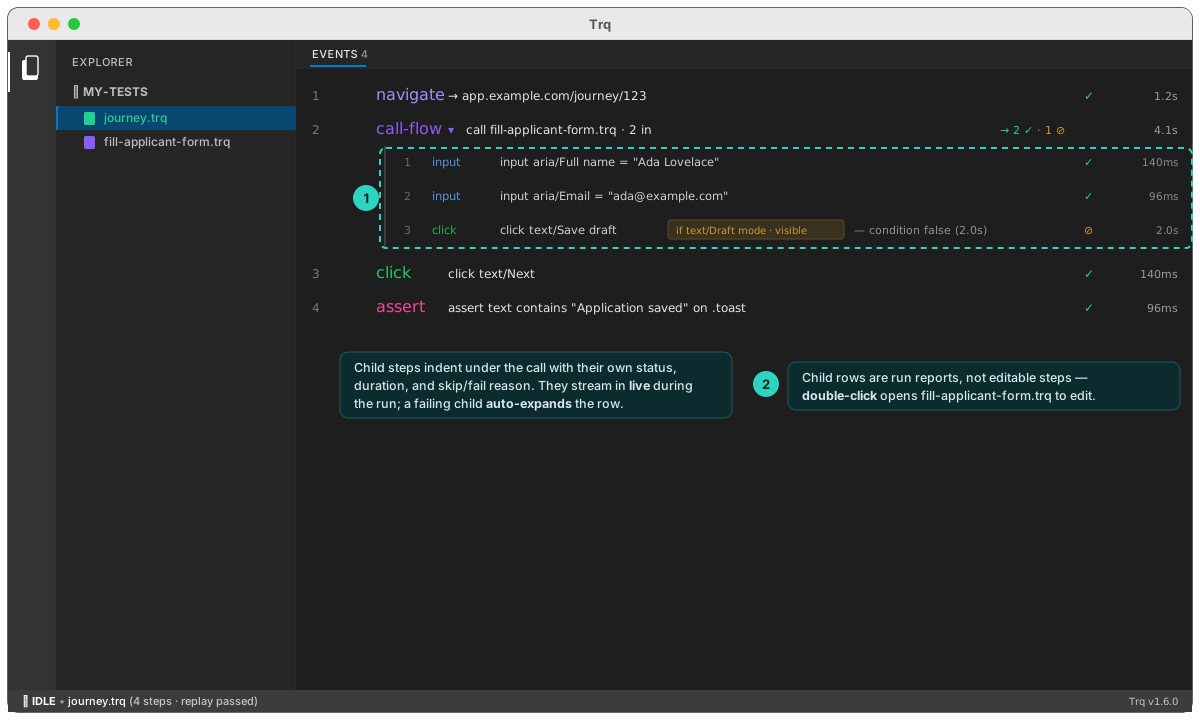
Child rows are run reports, not editable steps — double-click one to open the flow's own .trq and edit it there. Nested calls (a flow calling a flow) indent one more level. The Summary's step counts stay at the journey level, so sub-flows never double-count.
The CLI shows the same detail — trq play prints indented child lines:
2/4  …  call-flow   ▶ fill-customer-form.trq · 2 in
  2.1/3  ✓  input       Full name = "Ada Lovelace"
  2.2/3  ✓  input       Email = "ada@example.com"
  2.3/3  ⊘  click       "Save draft"
         skipped by condition — text/Draft mode not found (2.0s)
2/4  ✓  call-flow   ▶ fill-customer-form.trq · 2 in
When a child step fails
A failure inside a called flow pauses the run on that child step — not on the call row:
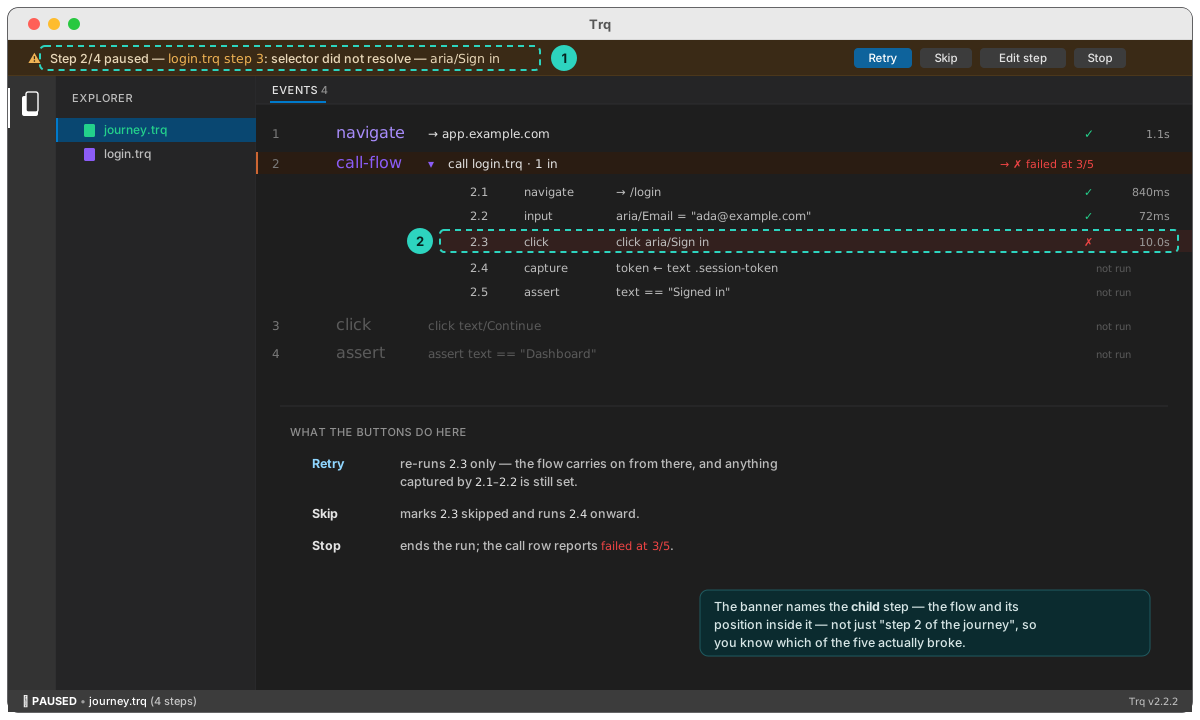
The banner names the flow and the position inside it (login.trq step 3), and the toolbar buttons act at that level:
- Retry — re-run that child step. The flow continues from there, and anything the earlier children captured is still set.
- Skip — mark the child step skipped and carry on with the rest of the flow.
- Stop — end the run; the call row reports
✗ failed at N/M.
Retry re-runs the step as it is. To change it first, open the flow's own
.trq(double-click the▶ callrow), edit and save there, then retry. Child rows in the expanded call are run reports, not editable steps.
Nested flows behave the same at any depth — a failure three flows down pauses on the step that actually failed.
Deleting, renaming, or moving a flow
A ▶ call row stores the flow it calls as a path. That makes deleting a flow other sessions rely on a quiet kind of breakage: the file goes, every caller still points at it, and nothing looks wrong until a run reaches that step. One shared login flow can easily have thirty call rows across eleven sessions.
Delete tells you who was using it
Deleting a flow that nothing calls just asks for confirmation. Deleting one that is called shows what it costs first:
- How much breaks — the number of call steps, and how many sessions they sit in.
- Which sessions, all of them, with a per-step count each. The names are the point: a count tells you the size of the problem, the names tell you whether you meant to do it.
- Clean up as you go, on by default. The orphaned
▶ callrows are removed from the calling sessions in the same action, so those tests keep running — minus those steps.
Untick the clean-up when you plan to repoint the calls at a replacement instead. The rows are left in place and marked broken, so you can find them.
Deleting a folder asks about every flow inside it, not just the folder name.
Broken calls are visible
A call row whose flow no longer exists is marked flow not found in the events list, and hovering it names the missing path. This covers every way a flow can disappear — a git pull that removed it, a teammate's rename, a file moved outside Trq — not just deletes you did yourself.
To fix one, right-click the row:
- Point at another flow… — opens the flow picker. If the same dead flow is called more than once in the session, Trq offers to repoint the rest in one go.
- Remove this step.
Rename and move repoint the callers automatically
Renaming or moving a flow updates every call row that pointed at it, across the whole project — the way an editor updates imports. Nothing is deleted, so there is no prompt; the calls simply keep working.
The call's alias is left alone. The alias names the call, not the flow, so every {{flow.<alias>.<name>}} token you already wrote keeps resolving after a rename.
When something calls the flow you're renaming, Trq says what it will rewrite before it does it — how many sessions, how many call steps, and which ones. The call steps keep their alias and inputs; only the path changes. A flow nothing calls is renamed without a word.
Rules worth knowing
- Extraction requires a contiguous selection — extracting a gapped selection would silently reorder the steps left behind, so Trq refuses it.
- Inputs are promoted only from typed values (input steps). Passwords and already-templated values are never offered.
- A flow runs in its own variable scope, seeded from the call's inputs. Nothing flows back into the caller's variables — the caller reads the child's values as
{{flow.<alias>.<name>}}. - Flows compose with everything: conditions, captures,
{{calc(…)}}, api-request steps, and mid-journey insert all work inside a called flow. - A flow cannot call itself, and a cycle between flows is refused at replay with the chain in the message (
circular call-flow: a.trq → b.trq → a.trq).