Debug — step through a replay
Click Debug (step through each event) to replay one step at a time. Trq pauses before each event; advance with Step over, jump ahead with Run to end, or Stop debug session. The toolbar shows paused at 4/12: click.
While debugging, the Inspector panel shows the element Trq is about to act on and its selector ladder, each rung graded:
- stable (✓) —
aria/…,text/…,data-testid/data-test/data-cy/data-qa, or a cleanid. - brittle (⚠) — positional XPath or deep CSS.
- dynamic (🚫) — framework-generated ids (
mat-…,ng-…,:r3:, numeric suffixes) that change between loads.
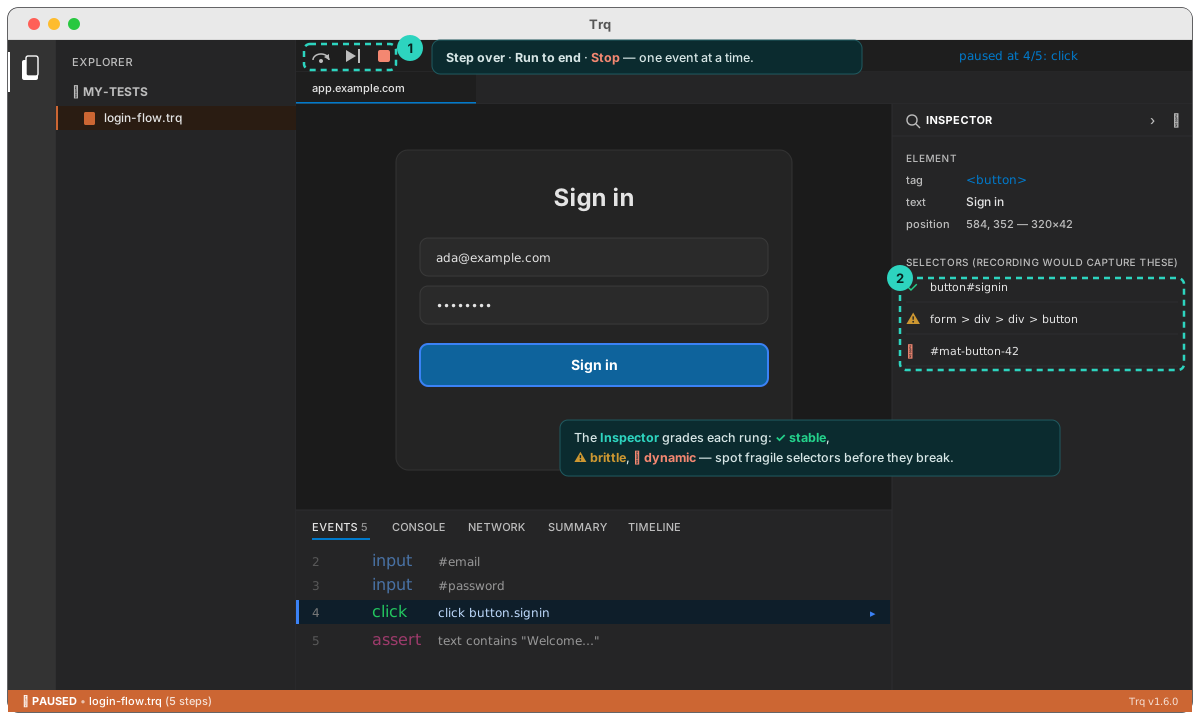
Use it to spot fragile selectors before they break.