Conditional steps — "Run only if…"
:::tip Guarding more than one step
This page is about a condition on a single step. To put several steps behind
one condition — with else and else if — see if / else blocks.
:::
Some pages don't always look the same: a cookie banner that only sometimes appears, a form that only renders when a toggle is ON, an OTP screen that only shows on new devices. A plain recording captures one of those states — and fails in the other.
A condition fixes that. Any step can carry a "Run only if…" guard: at replay time Trq checks it, and if it holds the step runs as recorded. If it doesn't, the step is skipped (⊘), not failed, and the run carries on.
The two kinds
Every condition is a question. What changes is who you ask:
| Element condition | Variable condition | |
|---|---|---|
| Asks | the live page | a value captured earlier in the run |
| Example | only if the cookie banner is visible | only if var.orderStatus equals UNPAID |
| Checks | visible · checked · enabled · text/value equals | equals · contains · matches · greater/less than · is set |
| Waits? | yes — up to 2s for the element to show up | no — decided instantly |
| Use when | the thing you're asking about is on screen right now | the thing that decides is something you read earlier |
Both are authored from the same place, and both skip rather than fail. Pick by asking yourself: is the answer on this page, or did I learn it three pages ago?
Author a condition
- In the Events tab, select the step — or multi-select (Cmd/Shift-click) a group of steps that share the same condition.
- Right-click → "Run only if… (N steps)".
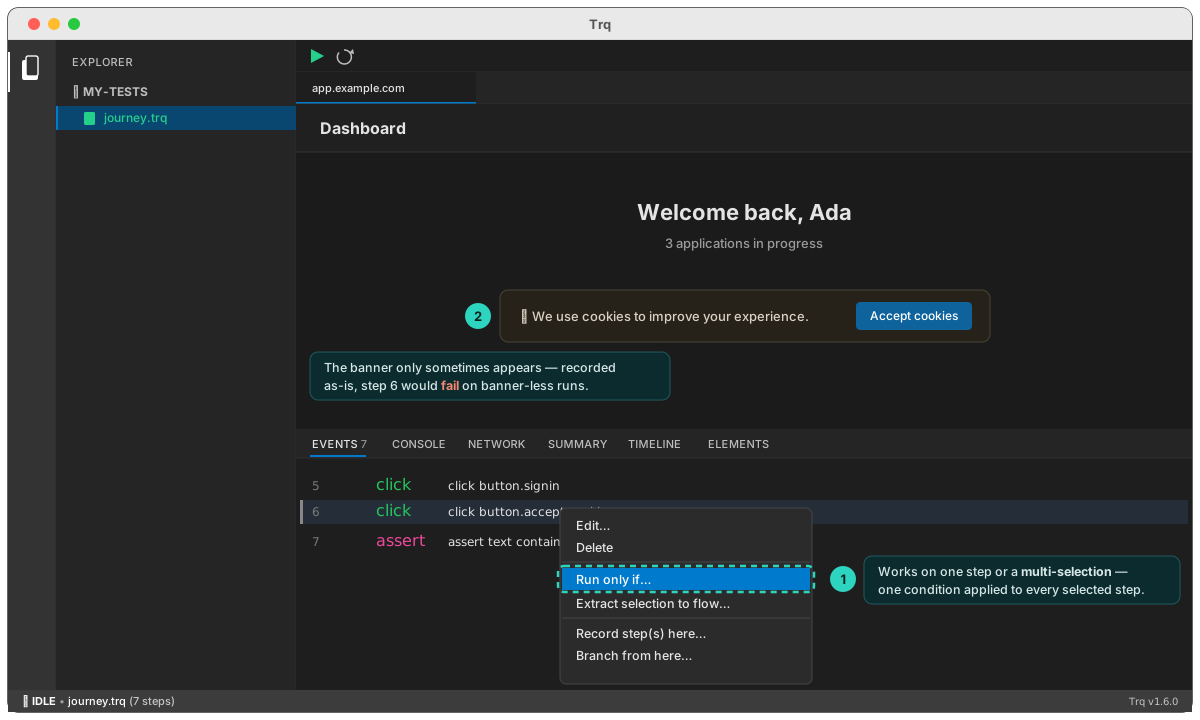
- Choose Condition on: an element or a variable at the top of the dialog — the rest of the form follows that choice.
Applying to a multi-selection puts one condition on every selected step. Each step still carries its own guard in the .trq, so you can delete or reorder steps freely — there's no block structure to break. Fine-tune or remove a single step's condition later in its Edit drawer → Condition section.
Element conditions — ask the page
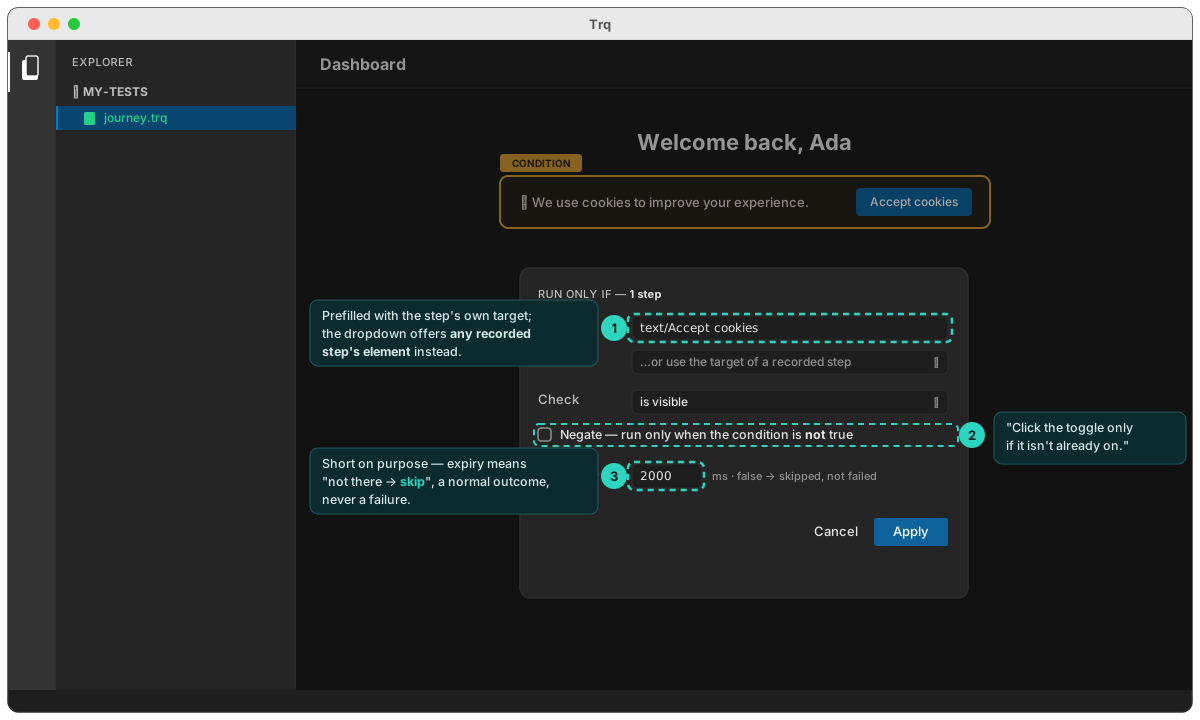
- Element — a selector for the element the condition inspects. It's prefilled with the right-clicked step's own target (the common "click X only if X is there" case needs no typing), or pick "…use the target of a recorded step" to reference any element another step touched — e.g. guard form-fill steps on the toggle an earlier step clicked.
- Check — is visible · is (not) checked · is enabled/disabled · text equals/contains · value equals. State checks read the real control state (
checked,aria-checked), the same way assertions do. - Negate — run the step only when the condition is not true. Perfect for "click the toggle only if it isn't already on".
- Wait up to — the condition window (default 2s, configurable in Settings). Deliberately short: if the element hasn't appeared by then, the answer is "not there" and the step skips. The window only exists to absorb render timing on late-mounting elements.
Consecutive steps with an identical element condition evaluate it once and share the verdict — a six-step guarded form pays the 2-second window once, not six times. (The verdict resets whenever a step actually executes, since the page may have changed.)
Example — a toggle-dependent form
The settings page renders the email fields only when Email notifications is ON, and Save works in both states:
1.  navigate  app.example.com/settings
2.  click     aria/Email notifications      if NOT aria/Email notifications · checked
3.  input     aria/Notification email = …   if aria/Email notifications · checked
4.  input     aria/Reply-to address = …     if aria/Email notifications · checked
5.  click     text/Daily digest             if aria/Email notifications · checked
6.  click     text/Save
7.  assert    text contains "Settings saved"
Step 2's negated guard turns the toggle on only when it isn't already (replaying a recorded click on an already-ON toggle would turn it off). Steps 3–5 then re-evaluate against the fresh state and fill the form. One recording, both starting states.
What a skip looks like
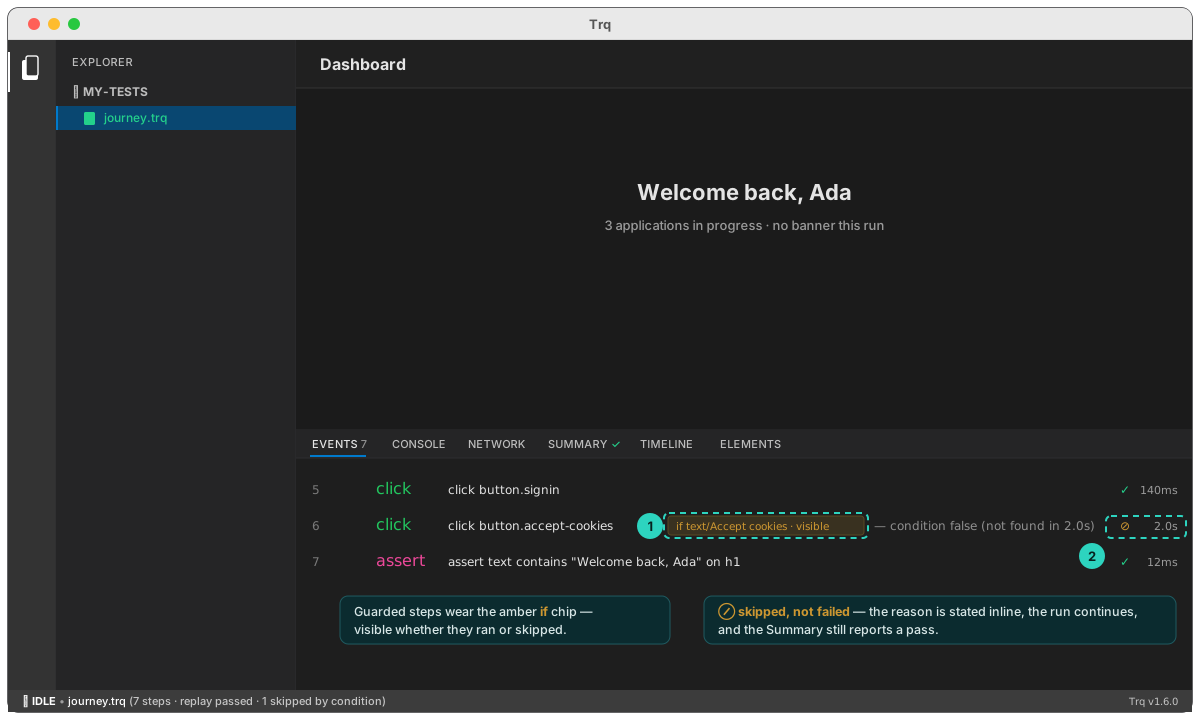
Guarded steps wear an amber if chip. On a run where the condition is false, they report ⊘ with the reason inline — and the run still passes:
Variable conditions — ask a captured value
Sometimes what decides the next steps isn't on screen any more. You read an application's status on the details page, navigate away, and everything after depends on what it said. An element condition can't help: the badge is three pages back.
A variable condition asks the question of a captured value instead.
Step 1 — capture the value
While recording, click the {x} button in the toolbar, then click the value on the page and give it a name. (Full walkthrough in Variables & templates.) That adds a capture step to the timeline:
2. capture .status-badge → var.orderStatus
The captured value is never written into the .trq — only the instruction is. It's re-read live on every run, which is exactly what makes the branch follow the data.
Step 2 — guard the steps that depend on it
Select the dependent steps → right-click → "Run only if…" → Condition on: a variable:
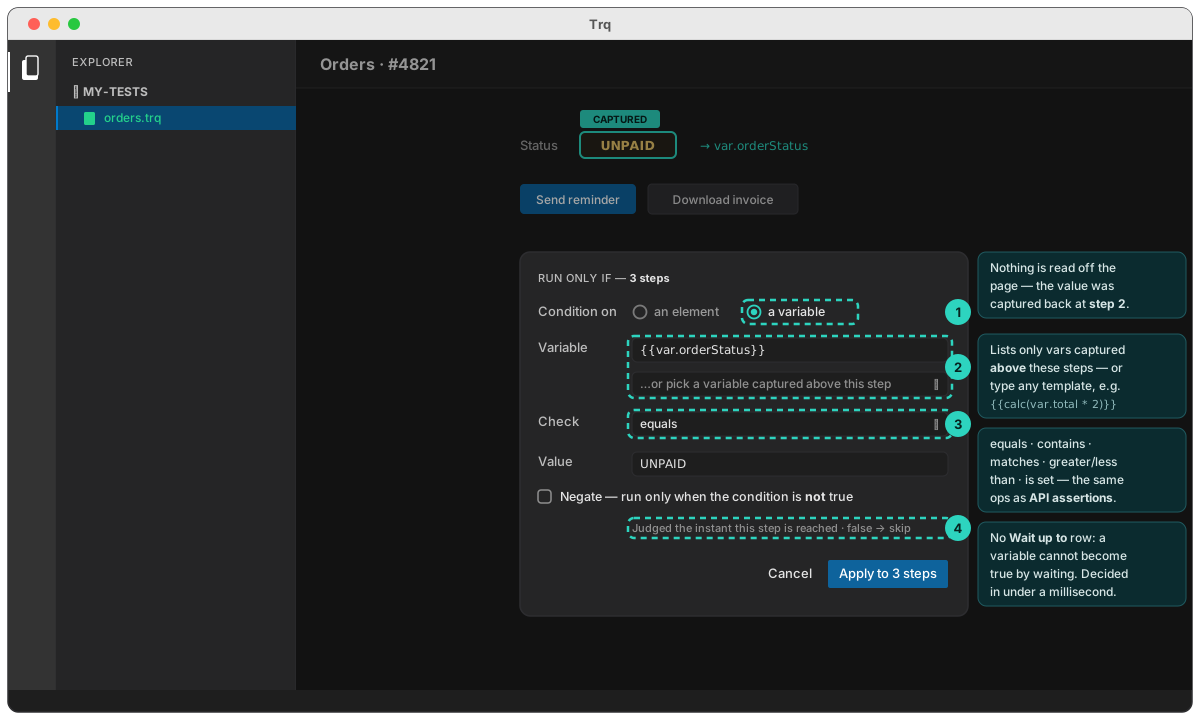
- Variable — pick from the dropdown, which lists every variable captured above these steps. (Only those can be trusted to hold a value by the time the guard is judged.) You can also type a template by hand:
{{env.TIER}},{{calc(var.total * 2)}}, or another{{var.x}}to compare two variables against each other. - Check —
equals·does not equal·contains·does not contain·matches (regex)·is greater than·is less than·is set·is not set. These are the same operators as API assertions, with the same rules — notablyequalscompares numbers numerically, so87equals87.0. - Value — what to compare against. Templatable too.
- Negate — inverts the verdict, exactly as in element mode.
There's no Wait up to row here, and that's deliberate: a variable can't become true by waiting. The value was already read. The condition is decided the instant the step is reached, in well under a millisecond — so a skipped block of ten guarded steps costs nothing at all.
Example — one file, two orders
An orders queue where the next action depends on whether the order has been paid:
1.  navigate  shop.internal/orders/4821
2.  capture   .status-badge → var.orderStatus
3.  click     button.remind            if var.orderStatus = "UNPAID"
4.  input     #note = "Reminder sent"  if var.orderStatus = "UNPAID"
5.  click     button.save              if var.orderStatus = "UNPAID"
6.  click     a.invoice                if var.orderStatus = "PAID"
7.  assert    .toast · text contains "saved"
Run it against an UNPAID order and steps 3–5 fire while 6 skips. Run the same file, unedited against a PAID one and it's the other way round:
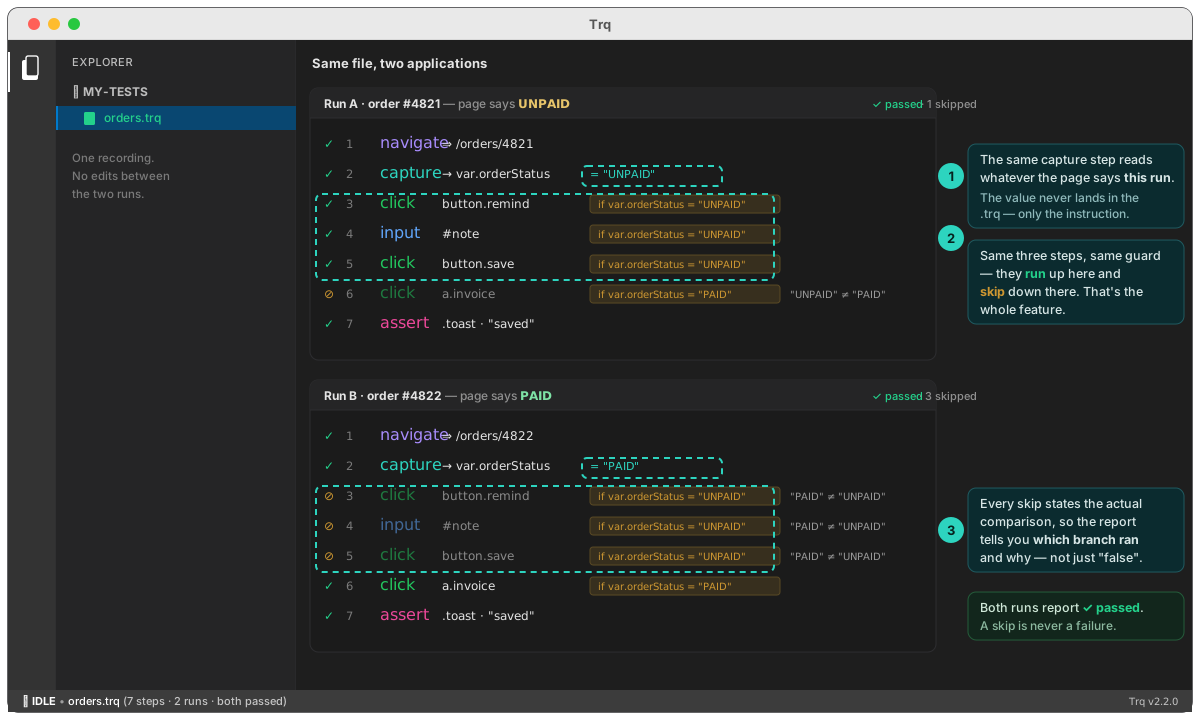
Every skip states the actual comparison, not just "false" — so the report tells you which branch ran and why:
3/7 click button.remind ⊘ skipped by condition — "PAID" ≠ "UNPAID"
Comparing numbers
is greater than / is less than coerce both sides to numbers, so a captured counter or total works directly — and calc() lets you compare against something derived:
3.  capture   .cart-total  → var.total      (regex \d+\.\d+)
4.  capture   .item-count  → var.items
5.  click     text/Apply free shipping      if var.total > "500"
6.  click     text/Split order              if var.items > "10"
A non-numeric value simply makes the comparison false (and the step skip) rather than erroring.
Using a captured value inside an element condition
The two kinds combine. An element condition's expected text can itself be a variable — the subject is still the live page, but what you compare it against comes from earlier in the run. That's the "only if this is the row I captured" check:
3.  capture   .order-id → var.orderId
…
9.  click     text/Archive     if #row-header · text equals {{var.orderId}}
Author it in element mode: set check to text equals, then type {{ in the Text field (or hit + Template) and pick the variable from the list.
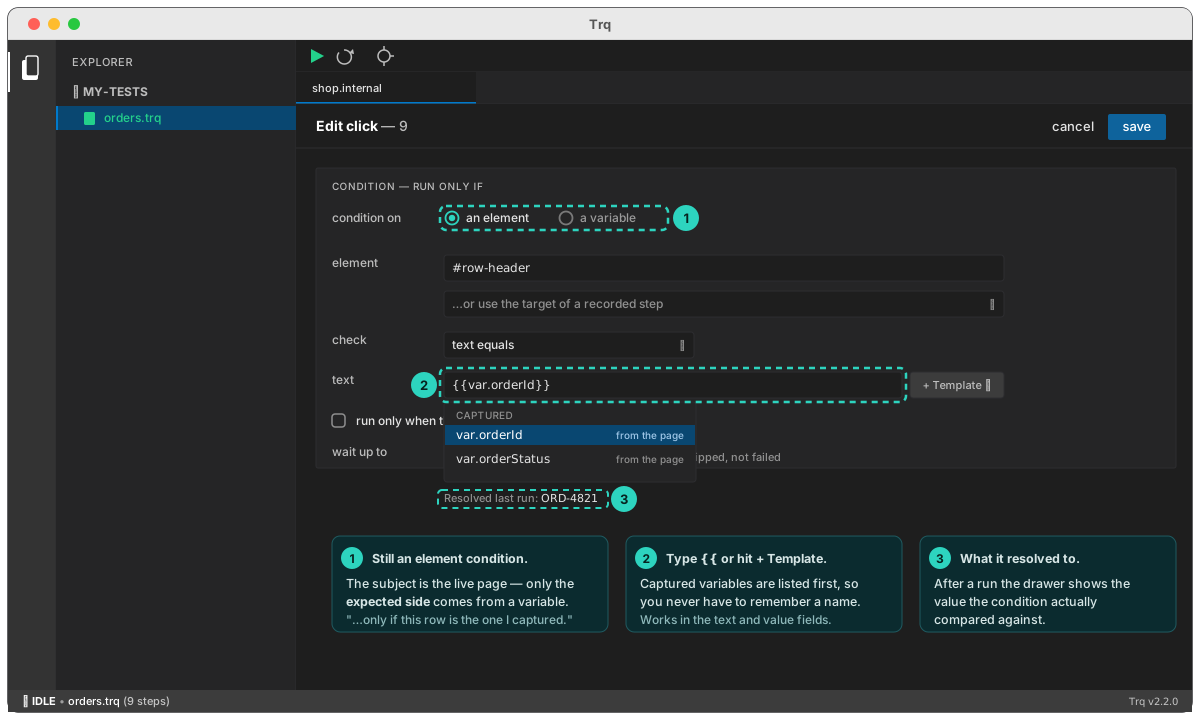
The autocomplete and the Resolved last run line live in the Edit drawer → Condition section. The right-click dialog accepts the same {{var.x}} text typed by hand, but the picker is only in the drawer.
If a condition references a variable that was never captured — a typo, or a capture step that sits below the guarded step — the condition is false and the step skips with var.whatever was never captured as the reason, rather than silently comparing against the literal text {{var.whatever}}. Picking from the dropdown avoids this entirely.
Skip vs. fail — the exact contract
- Condition false → the step is skipped: ⊘ in the Events list, reason in the report, run continues.
- Condition true, step fails → the step fails normally (pause-at-failure, retries, everything as usual). A guard never swallows a real failure.
- Assertion steps can be guarded too — "assert the badge is green, but only if the panel rendered".
- A variable condition reads the value as captured, not as it is now. To re-check the live page, use an element condition.
- Guards never loop or jump. They only skip or run, so a replay always terminates.
A guard that skips is silent by design — but if a feature breaks and its element never appears again, the guarded steps skip forever and the test stays green. Prefer guarding only genuinely optional UI, and keep at least one unguarded assertion on the critical outcome (like step 7 in the examples above).