if / else blocks
A conditional step guards one step. A block guards a range of them, with optional else and else if arms — so a session can take one of several paths without splitting into separate files.
Wrap some steps
- Select the steps the condition should govern — click one, or Shift-click a range.
- Right-click and choose Wrap in an if / else… (it names the count when you've selected several).
- Build the condition and confirm.
Three new rows appear in the list: an if marker, your steps indented beneath it, and an end marker. Everything between them runs only when the condition holds. Everything after end always runs.
The menu item tells you when a selection can't be wrapped and why — most often because the steps aren't contiguous, or because the range would straddle an existing block's boundary.
Add the other arms
Right-click the if marker:
| Menu item | What it does |
|---|---|
| Edit condition… | Change what this arm asks |
| Add else | A final arm that runs when nothing above it matched |
| Add else if… | Another condition, tried in order, before any else |
| Remove the if / else (keep steps) | Delete the markers; the steps stay, unguarded |
:::caution Before 2.9.0
An else if arm never matched. Its condition was not evaluated, so the else arm always won instead. If you are on 2.8.3 or earlier, either update or use a nested if / else until you do — a plain if / else was never affected.
:::
Arms are evaluated top to bottom, and at most one runs. Once an arm's condition holds, the rest are skipped without being evaluated at all.
Add else and Add else if… disable themselves once an else exists — an arm after the catch-all could never run, so Trq won't let you write one.
What a condition can ask
The same vocabulary as a per-step guard, so there is one thing to learn:
- Element conditions — is this element visible, present, enabled, or does its text match?
- Variable conditions — compare a captured
{{var.NAME}}against a value.
See Conditional steps for the full operator list and worked examples.
What a run looks like
Steps inside an arm that didn't run are marked skipped, not failed, and the row says which condition skipped it. They keep their original step numbers — a filtered or partly-skipped list never renumbers, because step 7 has to mean the same thing in the report as in the editor.
Markers are not steps. A session with nine steps and two blocks still reports "9 steps"; the if, else and end rows don't consume a number and never appear in a report as something that passed or failed.
Nesting
Blocks nest. A block inside a skipped arm is never evaluated — its condition would be asking the page about something the skipped steps never did.
An example
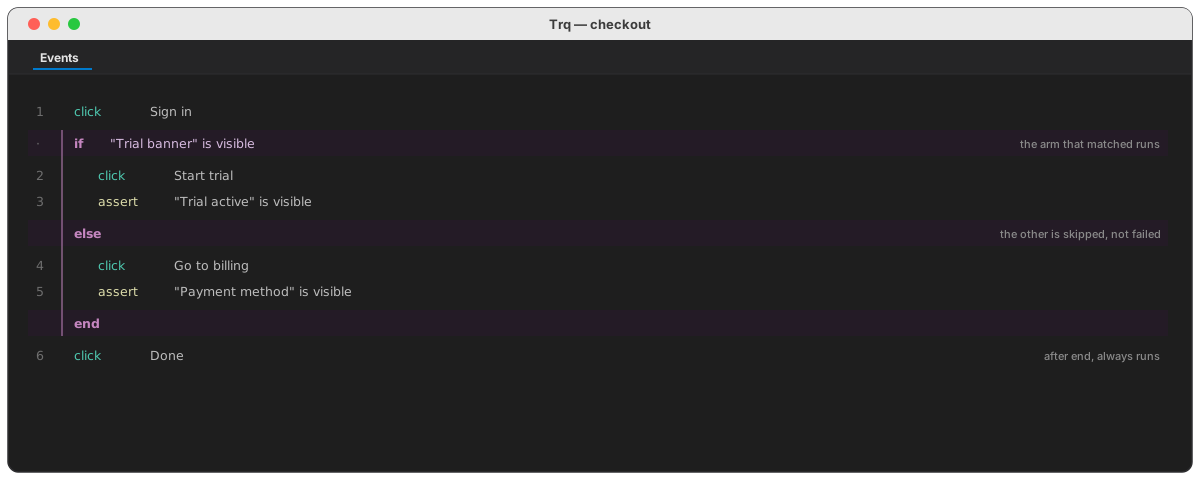
Guarding a trial-only flow:
1  click  Sign in
   if  "Trial banner" is visible
2    click  Start trial
3    assert  "Trial active" is visible
   else
4    click  Go to billing
5    assert  "Payment method" is visible
   end
6  click  Done
On a trial account steps 2–3 run and 4–5 are skipped; on a paid one the reverse. Step 1 and step 6 always run.
Half-authored blocks
An if with no condition yet takes its else arm rather than guessing — a marker you haven't finished should not silently run its contents.
A stray end with no matching if is ignored rather than failing the run. A session caught mid-edit still plays; refusing over one orphaned marker would be the worse failure.
See also
- Conditional steps — guarding a single step
- Variables — capturing the values a condition reads
- if / else blocks for API — the same feature, same implementation
- Conditions for mobile — the same structure, asking about a screen