Call an API & use its response
Sometimes a flow needs to talk to an API directly — to set up data before the UI test (create an account, seed a record), to read a value the UI never shows (an id, a token, a generated link), or to start from a URL the backend returns. An API request step calls an HTTP endpoint during replay, optionally pulls values out of the response into {{var.NAME}} variables, and the flow continues with them.
It runs server-side (Node fetch, not the page), so it isn't subject to the page's CORS rules and can run before any page has loaded — e.g. as step 1 to fetch the URL you then navigate to.
Add an API request step
- On any session (including an empty one), open the Events tab and click + Add step ▾ → ⚡ API request….
- Or right-click an event row → Insert step above / below ▸ ⚡ API request… to drop one at that position. See insert positions for all four.
Either opens the request builder in the Edit drawer.
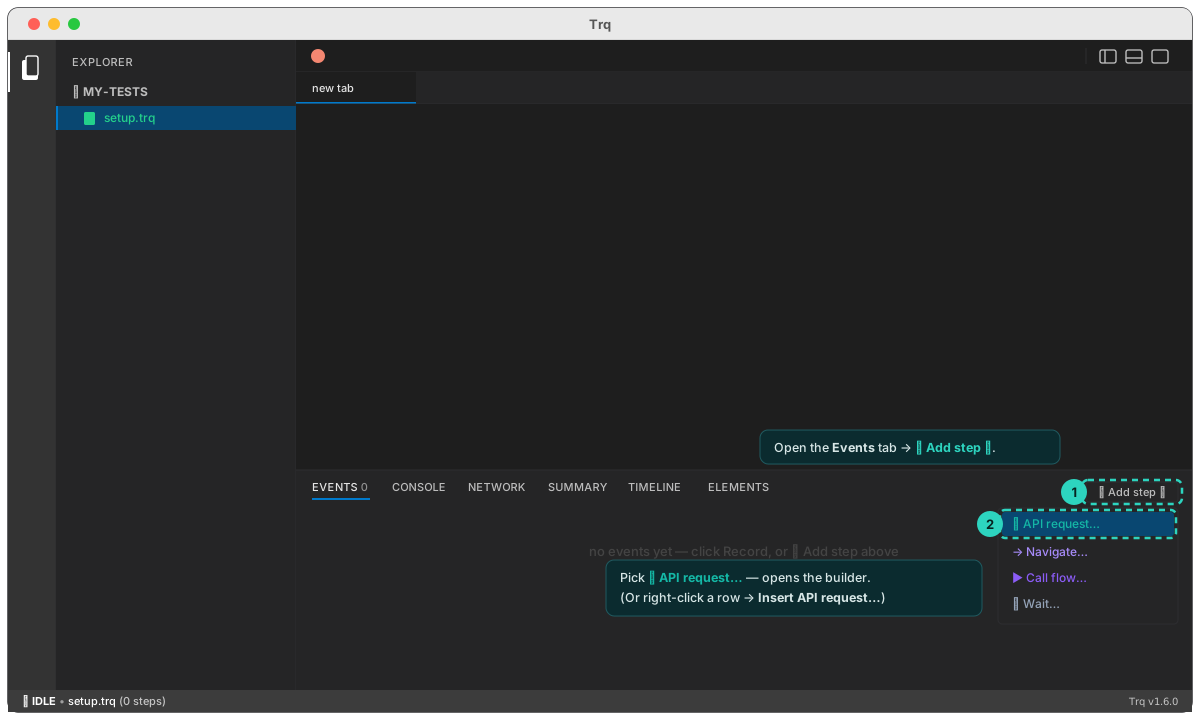
Build the request
- Method + URL — choose the verb (GET / POST / PUT / PATCH / DELETE) and type the URL. The URL accepts
{{…}}templates. - Params / Headers — key/value rows: an enable checkbox, key, and value (each value templatable). Disabled rows are skipped; Params are appended to the URL as
?k=v. Use Bulk edit to paste many at once. - Body — a JSON or raw body (templatable), sent for POST/PUT/PATCH. Beautify pretty-prints JSON; + Template inserts a value.
- Send ▸ — fires the request once, right now, so you can see the real response while authoring (it doesn't touch your saved steps).
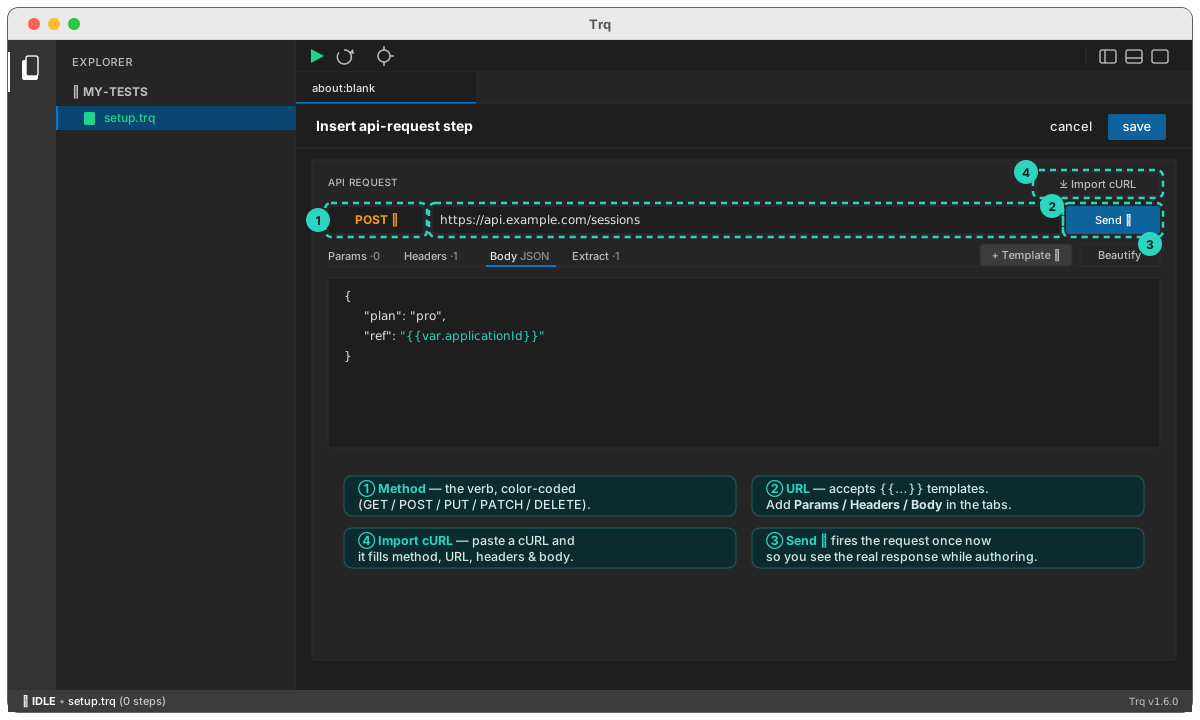
Import from cURL
Already have the request as a cURL command — DevTools → Copy → Copy as cURL, or from your API client? Click ⤓ Import cURL, paste it, and Import: the method, URL, query params, headers, and body are filled in automatically (the query string is lifted into Params, and -u user:pass becomes a Basic-auth header). Then tweak and Send.
Inspect the response
After Send, the response panel shows a colored status pill (● 200 OK), the time and size, with tabs:
- Body — pretty-printed (Beautify) or raw; the text is selectable so you can copy it.
- Headers — the response headers, as a table.
- Extracted — the values your extract rules pulled out (next).
Extract values into variables
The Extract tab maps a variable name to a location in the response, so later steps can reference it as {{var.NAME}}:
- JSON dot-path — e.g.
data.items[0].idreads that field out of a JSON body. /regex/— wrap a pattern in slashes to pull a substring from the raw body (capture group 1 if present, otherwise the whole match).
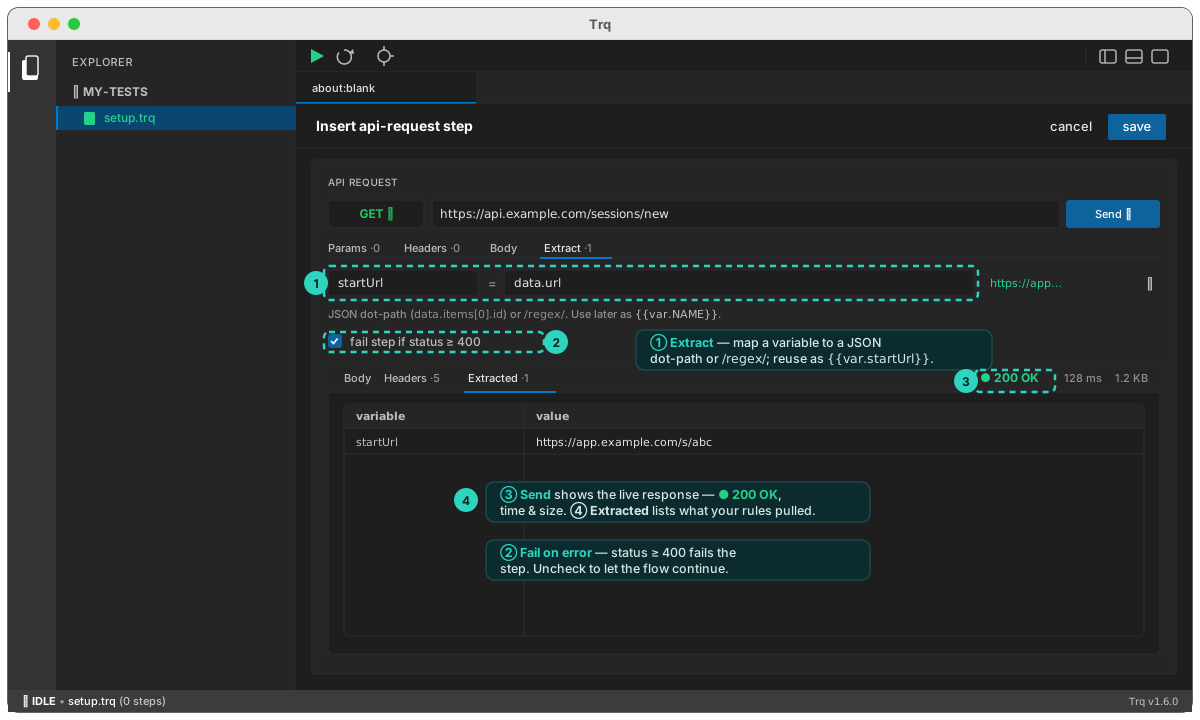
Extraction runs on every replay, so the variable always reflects the current run's data — just like a Capture step, but sourced from an API instead of the page. Reference the value anywhere {{…}} is accepted: a later input, a URL, a header, or an assertion.
Fail on error
By default any HTTP status ≥ 400 fails the step, so a broken setup call stops the run loudly. Uncheck Fail on error to let the flow continue regardless (e.g. when you only care about extracting whatever came back).
Example — fetch a URL, then drive it
1.  api-request  GET  https://api.example.com/sessions/new
                  extract:  startUrl  ←  data.url
2.  navigate     {{var.startUrl}}
3.  click        #continue
…
Step 1 calls the API with no page open, pulls data.url into startUrl, and step 2 navigates the browser to that run's real URL. (This is exactly why the Record Start URL can be left blank — the first step can produce it.)
API request steps run in Play, Resume, and Debug — same engine everywhere.