Variables & templates
Capture a value & reuse it
Some flows need a value the app generates at runtime — an application ID shown on one page, a confirmation number, a token — fed into a later step (a search box, a URL, an assertion). A Capture step reads a value off the page during replay and stores it in a run-scoped variable you reference later as {{var.NAME}}.
Author a capture
While recording, click Capture in the toolbar (next to Assert) — it turns blue — then click the element holding the value.
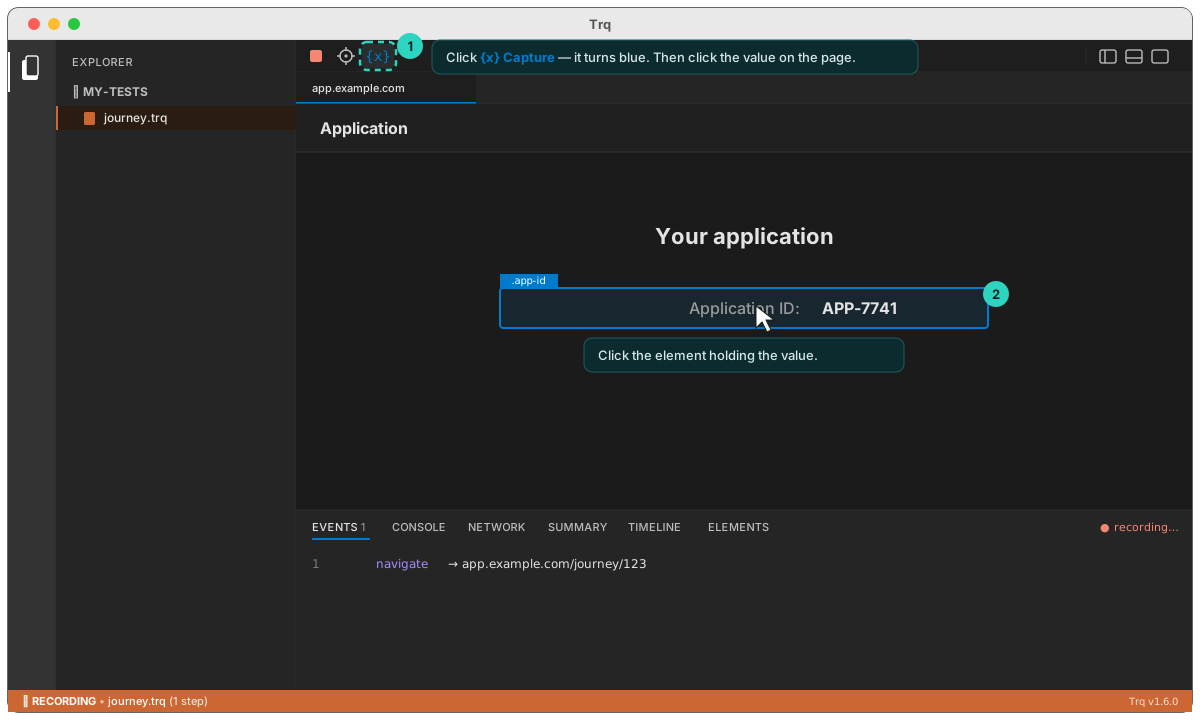
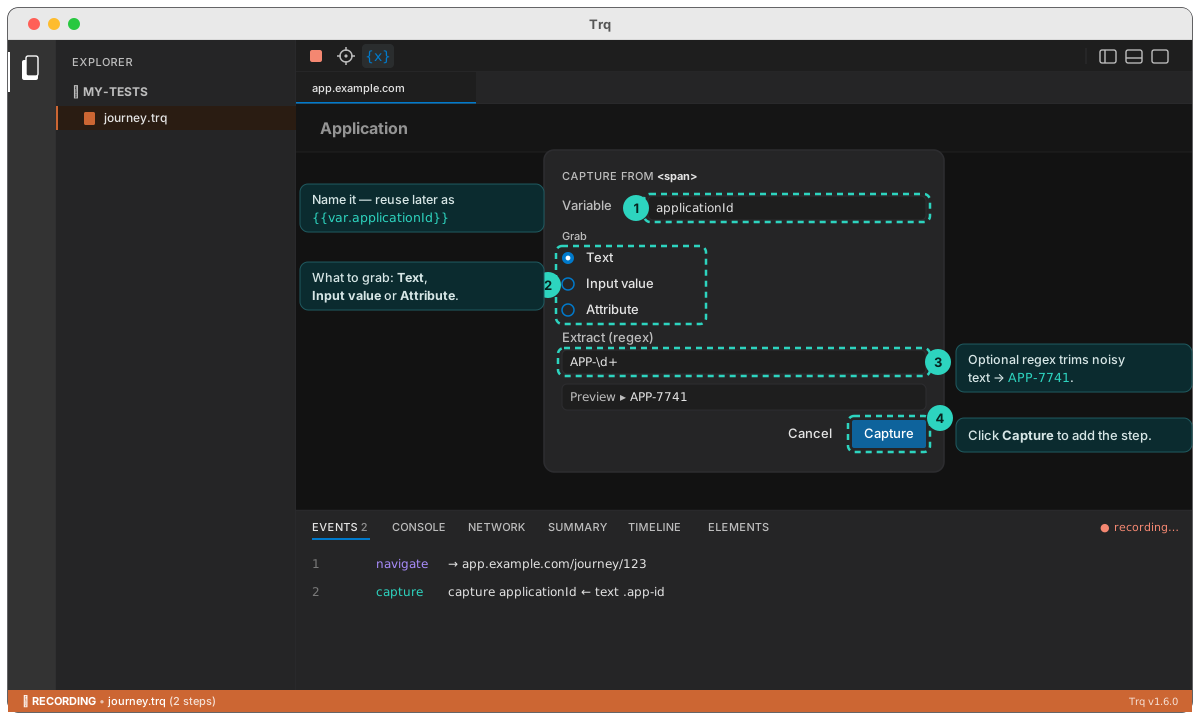
A small menu lets you choose:
- Variable — the name you'll reference later, e.g.
applicationId(auto-suggested from the element). - What to grab — the three extraction kinds:
- Text — the element's visible/accessible text. For labels, spans, headings, table cells.
- Input value — an
<input>/<textarea>/<select>.value(or a checkbox/radio's checked state). - Attribute — a named attribute such as
href,data-id, orvalue. For values that live in markup, not visible text.
- Extract (regex) — optional. Pull just the part you want out of noisy text. If the pattern has a capture group, group 1 is used; otherwise the whole match. e.g.
APP-\d+turnsApplication ID: APP-7741intoAPP-7741.
Click Capture, and a capture step is recorded — shown in the Events list as capture applicationId ← text .app-id (teal badge).
Reuse the captured value
In any later input value, navigate URL, or assertion text, reference it as {{var.NAME}}. Open the + Template menu (or type {{) — captured variables appear under a Captured category, so you click to insert; no need to type the var. prefix. The Edit drawer shows the last run's resolved value beneath the field.
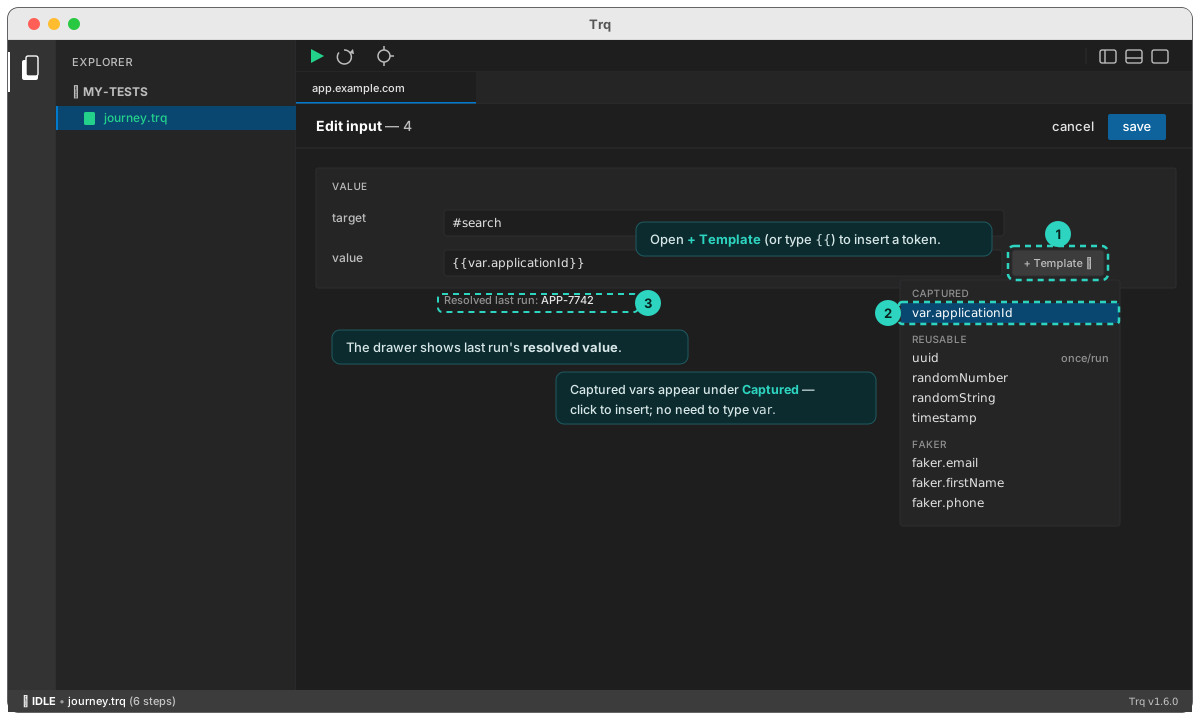
The value is read fresh on every run — only the instruction (selector + variable + kind) is saved in the .trq, never the value — so it always reflects the current run's data. (The capture step must run before the step that uses it.)
Example
1.  navigate   https://app.example.com/journey/123
2.  capture    applicationId  ←  text  .app-id        (regex: APP-\d+)
3.  navigate   https://backoffice.example.com/search
4.  input      #search  =  {{var.applicationId}}
5.  click      .search-btn
6.  assert     text-equals  {{var.applicationId}}  on  .result-id
On each run Trq reads the live id (e.g. APP-7742), types it into the back-office search, and asserts the result. Capture works across tabs and cross-origin iframes, and in Play, Resume, and Debug. If a value loads slowly, capture polls until it appears.
Value templates
Any URL, input value, or assertion text accepts {{…}} templates, resolved fresh each run. Type {{ for inline autocomplete, or use the + Template menu:
- reusable —
{{uuid}},{{randomNumber}},{{randomString}},{{timestamp}}— generated once per run and reused everywhere the same token appears (see below). - faker —
{{faker.email}},{{faker.firstName}},{{faker.phone}},{{faker.uuid}}, … - random —
{{random.string(8)}},{{random.int(1,99)}},{{random.alpha(6)}} - date —
{{date.iso}},{{date.now}},{{date.future(7)}} - env —
{{env.MY_VAR}}(reads the environment at run time) - var —
{{var.NAME}}— a value grabbed earlier by a Capture step or an API request's Extract; appears under the Captured menu category.
The Edit drawer shows the last run's resolved value beneath each templated field.
Reusable values — generate once, reuse across steps
The faker / random / date tokens regenerate on every step, so you can't create something on one page and find it on another. The reusable tokens fix that: they generate a value once per run and return that same value wherever the identical token appears — so you can name an entity in one step and search for it in a later step. A new value is generated on each Play/Resume (so reruns don't collide), stable within that run.
| Token | Value |
|---|---|
{{uuid}} | a v4 uuid |
{{uuid(8)}} | first 8 hex chars (dashes stripped) — a short id; {{uuid(2,6)}} takes a substring |
{{randomNumber}} / {{randomNumber(1000,9999)}} | a random integer (default 6 digits) |
{{randomString}} / {{randomString(12)}} | random alphanumeric (default length 8) |
{{timestamp}} | run-start epoch milliseconds |
Add a :label for a second, distinct value: {{uuid:orderId}} and {{uuid:invoiceId}} generate two different uuids, each reused under its own name.
3.  input    #name     =  page-{{uuid(8)}}      →  page-f03a19e0
4.  click    #create
…
9.  input    #search   =  {{uuid(8)}}           →  f03a19e0   (same value, same run)
{{uuid(8)}}is its own short id — not the first 8 chars of{{uuid}}. For a stable handle reused in several places, use a named token consistently (e.g. always{{uuid:orderId}}).