Making clicks reliable (readiness & waits)
The most common flake is a click that "works sometimes." It happens when Trq clicks a button before the page's JavaScript has wired up its handler — the element is on screen, but the framework (React/Angular/Vue) hasn't attached the onClick yet, or a still-loading chunk hasn't run. The click lands on nothing and the step silently does nothing.
Trq fixes this with a layered set of waits. Each layer is independent — use as few or as many as your app needs. They're listed from "always on, zero config" to "most explicit, most control."
Layer 1 — Actionability checks (automatic)
Before every click, Trq already waits until the target element is:
- enabled — not
disabled,aria-disabled, orpointer-events:none, - stable — its position hasn't moved for two animation frames (not mid-animation), and
- the real hit-target — nothing is covering it (no overlay/modal/spinner on top).
This is on by default and needs no configuration. It catches overlay and disabled-button flakes. It does not, on its own, wait for late-loading JS — that's what the next layers add.
Layer 2 — Wait before each action (Settings → Readiness)
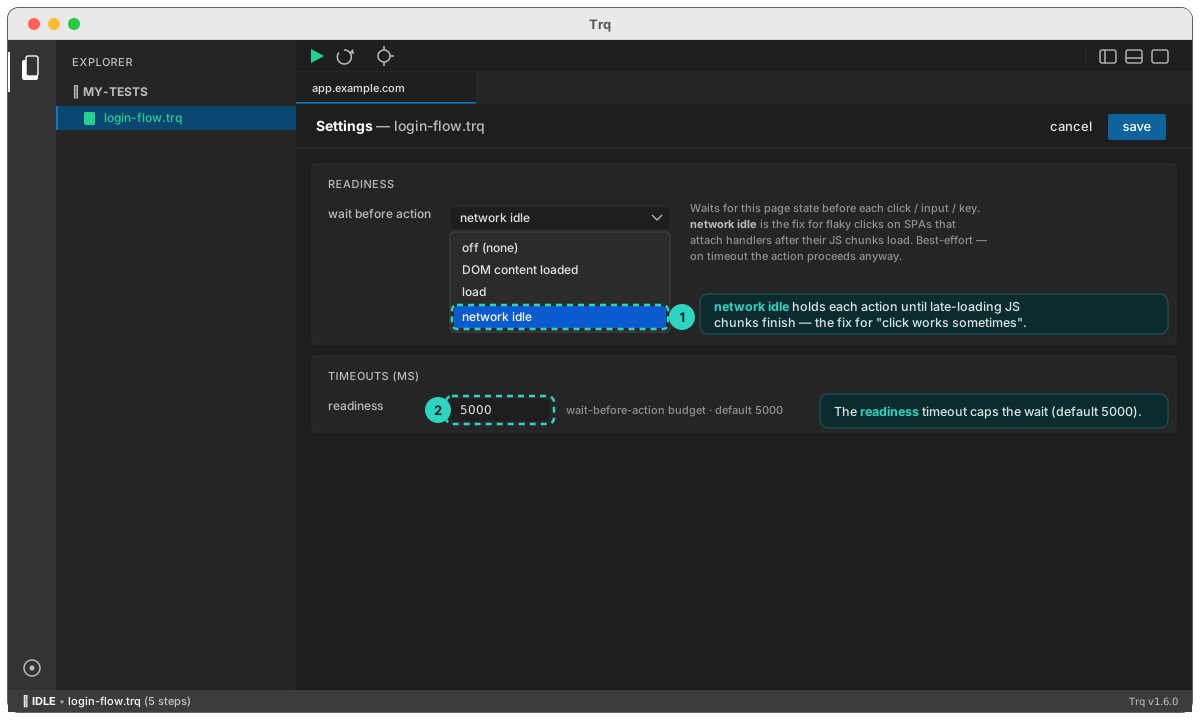
Open Settings → Readiness → "wait before action" and pick a page state to wait for before every click / input / keypress / drag / upload in the session:
| Option | Waits until… | Use when |
|---|---|---|
| off (default) | (no extra wait) | the app is fast / static |
| DOM content loaded | the HTML is parsed | you only need the DOM present |
| load | the load event fired (HTML + images + CSS + scripts) | sub-resources matter |
| network idle | load and the network has been quiet (~500 ms) | the flaky-click fix — SPAs that attach handlers after their JS chunks finish loading |
For the "sometimes works" click problem, choose network idle. It holds each action until the late-loading chunk that wires up the handler has actually finished. It's best-effort: if the page never settles within the readiness timeout (Settings → Timeouts → readiness, default 5000 ms), Trq proceeds anyway rather than failing.
Heads-up on
network idle. It adds up to ~half a second per action on fast pages, and on apps with constant background polling it may always hit the timeout. Turn it on for sessions that are actually flaky, not globally.
Layer 3 — Wait before one step (per-event override)
If only one click is flaky, you don't need to slow the whole run. Open the Edit drawer on that step → "Wait before this step" → custom condition, and set a wait that applies to just that event. You can wait for a load state, or for a specific element/text/URL/network response — e.g. "wait until #submit is enabled before clicking it."
Layer 4 — Insert a standalone wait/assert step
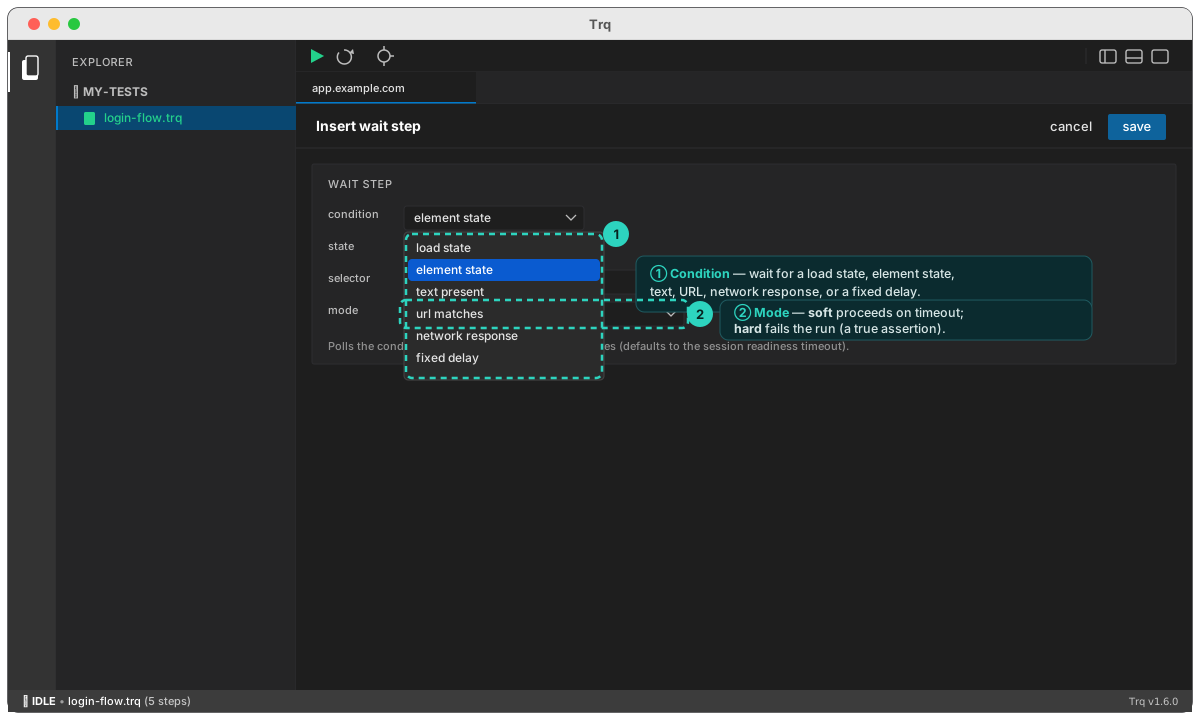
Right-click any step in the Events tab → Insert event above / below to drop a free-standing wait step into the timeline. Pick what to wait for:
- load state —
domcontentloaded/load/network idle - element state —
visible/hidden/enabled/attached/detached - text present — text appears (optionally scoped to a selector)
- url matches — the URL matches a substring or
*glob - network response — a response for a URL pattern arrives
- fixed delay — a flat pause (escape hatch; see below)
Each wait has a mode:
- soft (default) — wait: if the condition isn't met by the timeout, proceed anyway.
- hard — assert: if the condition isn't met by the timeout, fail the run.
What to do — and what to avoid
✅ Do — wait on a consequence. The most robust pattern is to assert on what the click was supposed to cause, not to guess a delay. After a click that opens a dashboard, add an assertion (or a hard wait) for "Dashboard heading is visible" or "url matches */dashboard". Waiting for the real outcome auto-retries until it's true — precise, self-documenting, and fast.
✅ Do — prefer the narrowest layer that fixes it. A per-step "wait until this button is enabled" (Layer 3) is better than turning on network idle for the whole session (Layer 2), which is better than sprinkling fixed delays.
🚫 Don't — lean on delay (fixed sleeps). Too short and it still races, too long and every run pays. Use it only when there's genuinely no observable signal to wait on.
🚫 Don't — globally enable network idle "just in case." On chatty apps it never goes idle and burns the timeout on every action.
🚫 Don't — crank timeouts to paper over a missing wait. A 60-second action timeout doesn't make a too-early click correct — it just makes failures slow.
Rule of thumb: assert the consequence (Layer 4, hard) when you have a clear outcome to check; use
network idle(Layer 2/3) for "handler not wired yet" flakes; reserve fixed delays for nothing-else-works cases.