Configure the run (Settings)
Open the ⚙ gear in the toolbar for a mobile session's settings — per-session timeouts and behaviour toggles, mirroring the web settings drawer.
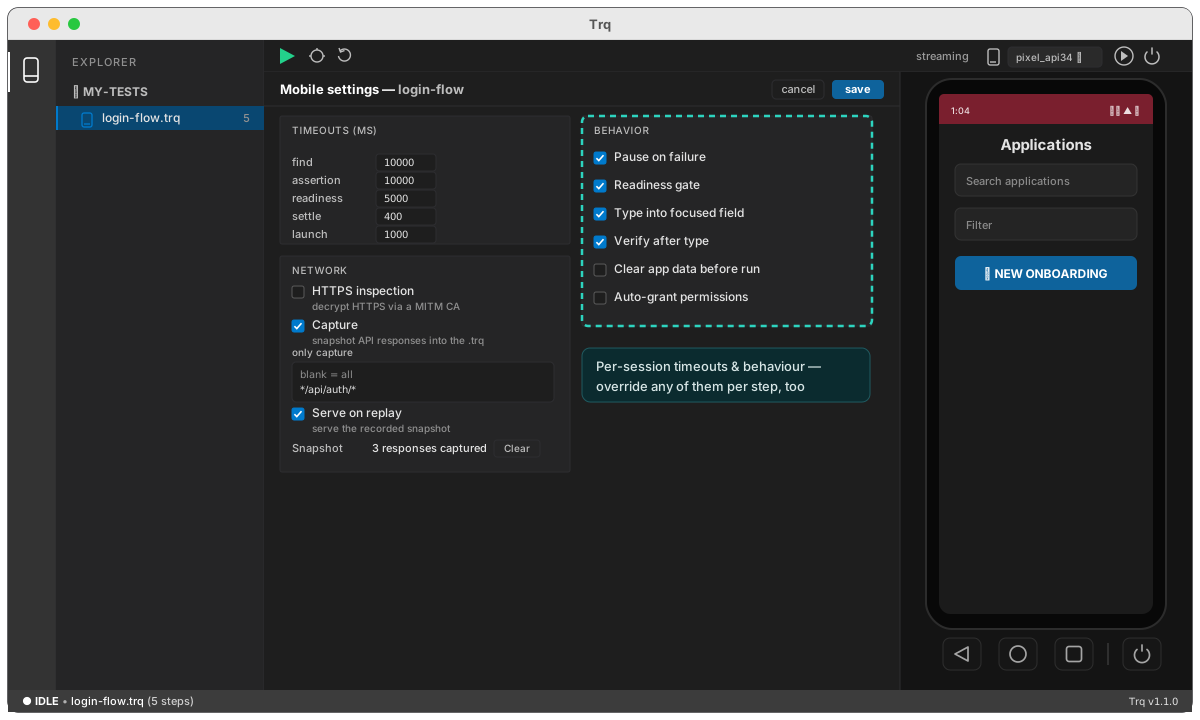
Timeouts
Tune how long each stage waits, in milliseconds — find, assert, readiness, settle (the pause after a tap), and launch. Any of these can also be overridden for a single step in the Edit drawer.
Behaviour
Toggle, the same way web does:
- Pause on failure — pause at the culprit instead of ending the run (see playback).
- Readiness gate — wait for the screen to settle before a coordinate tap.
- Settle the element before tapping — re-read a found element until it stops moving, then tap where it is now (see reliability).
- Type into focused field — send typing to the focused input.
- Verify after type — check the text actually landed (see reliability).
- Clear app data / Auto-grant permissions — start each run from a deterministic state.
- Network — HTTPS inspection and mock capture/serve (see network and mocking).