Environments
A mobile flow often has to run against more than one backend — dev, staging, prod. The taps are identical; only the API base URL and the login credentials change. Environments let you record the flow once and swap those values at run time, with no re-recording. It's the exact same feature as on web — one shared model across both engines.
Author with {{env.KEY}}
Anywhere a step takes a value — a typed field, an assertion, an API request — reference an environment variable as {{env.KEY}}. A login flow becomes backend-independent:
1.  launch    <app>
2.  tap       usernameInput
3.  type      usernameInput = {{env.username}}
4.  tap       PROCEED
5.  type      passwordInput = {{env.password}}
6.  tap       LOGIN
7.  assert    text contains "Welcome"
Nothing names a specific account — the values come from whichever environment is active.
Native apps usually read their backend URL from a build config or a first-run setting rather than a typed URL bar. So on mobile, {{env.baseUrl}} is most useful in API-request steps and in text you type into the app; the app's own environment switch (if it has one) is driven by the value you enter.
Pick the active environment
The Env control sits in the device toolbar, next to the emulator picker and the Play button. Click it to switch between dev / staging / prod (or No environment) — the next Play/Resume/Debug uses that environment's values. The selection is remembered per project and is shared with the web view.
Manage environments
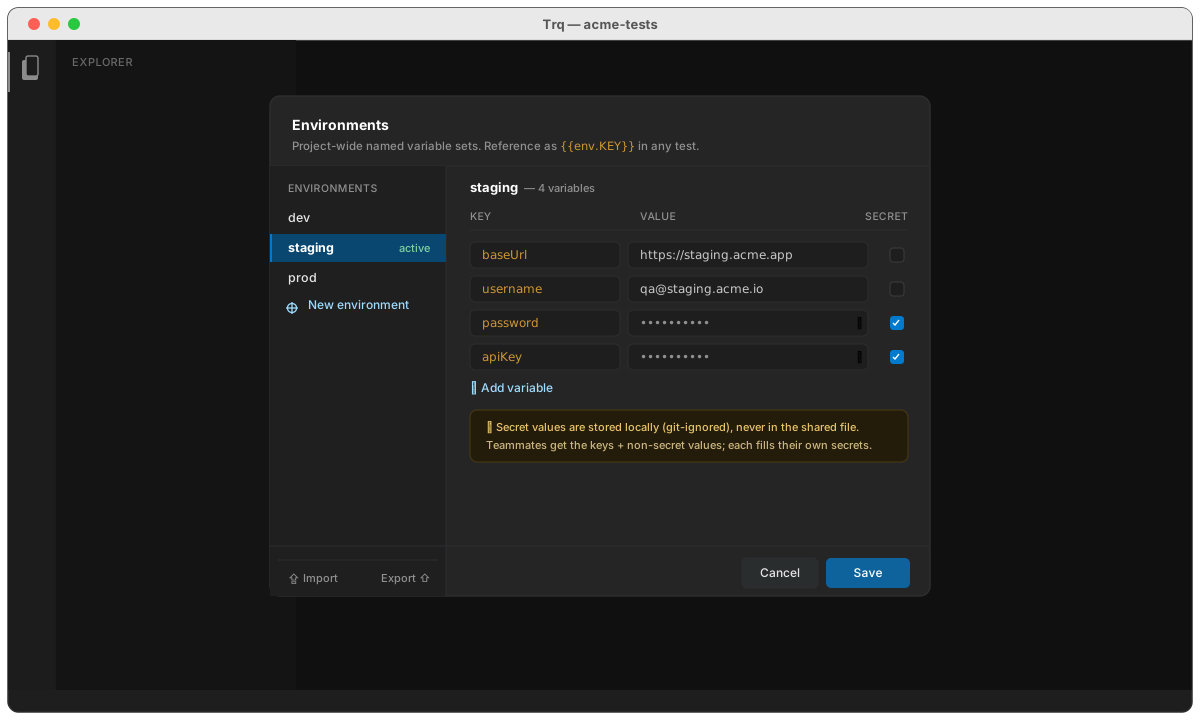
Manage environments… opens the editor — a rail of environments on the left, a key/value table for the selected one on the right (identical to web):
- Add environments and give each its own
baseUrl,username,password,apiKey, or any keys you need. - Tick Secret to mask a value in the UI.
- Environments live in one project file,
.trq-environments, next to your.trqflows — versioned and shareable.
Secret values are currently stored in .trq-environments in plaintext (the same as recorded passwords today). A local, git-ignored secret store is coming. Until then, don't commit real production secrets — keep those environments local, or use throwaway test accounts.
Run from the CLI
Environments drop straight into CI — pick one with --env:
trq play login --env staging
Without --env, the run uses the project's currently-active environment (the one you picked in the toolbar), so the CLI and the Studio agree.
How resolution works
{{env.KEY}} reads from the active environment (a missing key resolves to empty). It's a separate namespace from captured variables ({{var.NAME}}) and generators ({{uuid}}, …), so they never collide — see Variables & templates. Mobile and web resolve {{env.*}} through the same engine, so a flow behaves identically on either.