Editing a test
Double-click any step in the Events panel to open the Edit drawer — the mobile twin of the web editor.
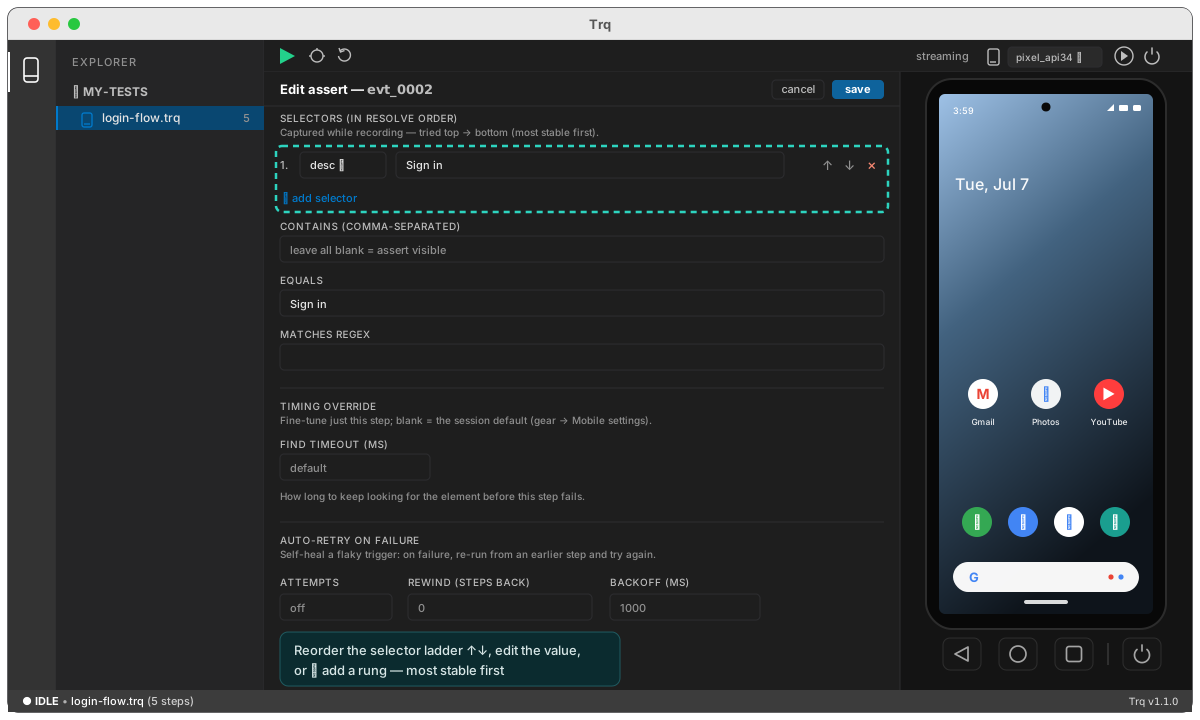
From here you can:
- Reorder the selector ladder. Move the ranked rungs up/down, remove a fragile one, or add a new one — the same self-healing ladder Trq uses at replay.
- Edit the value. Change the typed text, the assertion (contains / equals / regex / checked), the coordinate, the launch package, and so on. Values accept
{{ }}templates. - Set per-step overrides. Any session default — a timeout, the readiness gate, verify-after-type — can be overridden for just this step; leave a field blank to inherit the session setting.
Changes save straight to the .trq file. To re-target a step against the live screen instead, see Pick element during a paused failure.