Check for spec changes
An imported suite rots. The service ships a new required parameter, starts answering 201 where it answered 200, renames a field. Your tests either keep passing against a shape the API no longer has, or start failing for a reason that reads like a bug in the test.
Re-importing is not the fix. It would restore the method and the path and throw away the body values, the extracted variables, the tests and the ordering that turned a catalogue of operations into a case.
Check for spec changes re-reads the document, compares it against the requests it produced, and applies only the parts it can apply without destroying anything you wrote.
Step by step
1. Right-click a folder → Check for spec changes…
The gesture lives on a folder because that is where it is discoverable, but the check is project-wide. Imported requests get moved into the cases that use them — that is the point of importing them — so a check that only looked where they landed would go blind the first time someone reorganised.
2. Pick the document, if there is more than one
With a single registered spec the picker is skipped. A picker with one option is a step, not a choice.
3. Read the report
The report has three parts.
Changed
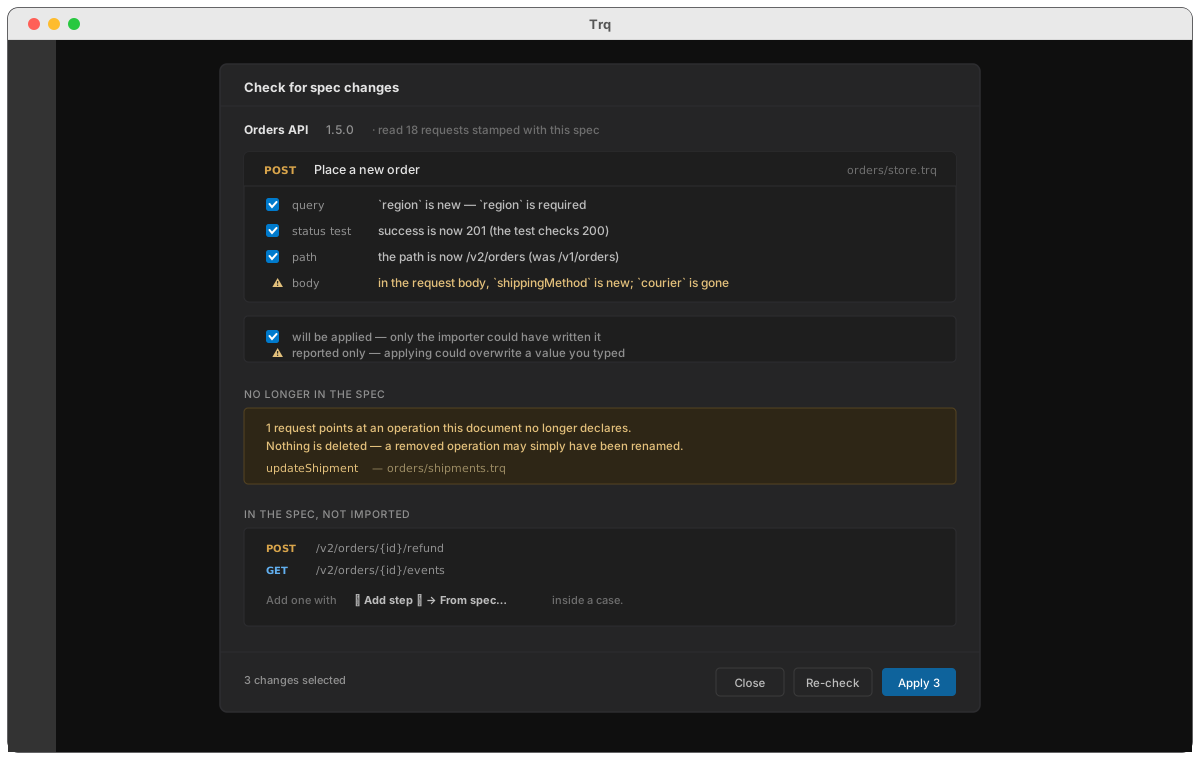
One card per request whose operation moved, with a line per field. For example, after the service added a required region parameter and changed its success code:
| Field | What it says | |
|---|---|---|
query | region is new — region is required | ☑ |
status | success is now 201 (the test checks 200) | ☑ |
body | in the request body, shippingMethod is new; courier is gone | ⚠ |
Ticked boxes will be applied. The ⚠ rows will not — read on.
No longer in the spec
Requests pointing at an operation the document no longer declares. Nothing is deleted. A removed operation may simply have been renamed, and your request may still be the right test.
In the spec, not imported
Operations the document has that nothing in the project covers. Useful as a to-do list; add them with + Add step ▾ → From spec….
4. Apply
Press Apply and only the ticked fields are written, request by request. Then the report re-runs, so what you see is the state after the change rather than the state you started from.
What is safe, and what is only reported
This split is the whole design.
A change is safe when the only thing it could overwrite is something the importer generated in the first place:
| Safe to apply | Why |
|---|---|
| method | nothing but the import ever set it |
| path | only the path portion — your base is left alone, because it may point at a different environment now |
| new parameters and headers | added the way a fresh import adds them: required ones enabled, optional ones present but switched off |
| dropped parameters | removed only while still holding their generated {{var.x}} placeholder |
| status test | generated, so re-pointing it destroys nothing |
| schema test | likewise — and only when one already exists |
A change is reported only when it might overwrite something a person typed:
| Reported, never written | Why |
|---|---|
| request body | it holds your values. The report names exactly which fields are new and which are gone, which is the useful half |
| a hand-edited URL | if the URL ends with neither the old path nor the new one, you rewrote it, and Trq will not guess |
| auth | it may hold a credential or a variable the spec knows nothing about |
| a parameter you filled in | a value is a value, whatever the spec now says |
:::note Headers you added are not drift
The spec never mentioned your Content-Type or your tenant header. Dropping them because of that would be a bug wearing a sync's clothes, so a row the spec never supplied is never reported as removed.
:::
Two details that decide whether this is useful or annoying
A moved operation reports as a move. Matching tries the spec's operationId first and falls back to method + path. So renaming /v1/orders/{id} to /v2/orders/{id} reports as "the path is now /v2/orders/{id}" on your existing request — not as one removal plus one phantom addition you would have to reconcile by hand.
It works the other way too: a document that later gains a real operationId where it had none does not orphan every request imported from it.
Applying re-stamps. After a change is applied the request remembers where the operation is now. Without that, the next check would compare against the old location and report the identical drift for ever — a tool that nags about work you already did.
What is not synced
Your name, Extract rows, Scripts, Condition, Retry and Poll settings are never touched by a sync, in any mode. They are not in the spec and the spec has no opinion about them.
See also
- Import from OpenAPI — where the stamp comes from
- Assertions — the status and schema tests a sync can re-point