Scripts
The Extract and Tests tabs cover the common cases without code. Scripts are the escape hatch for everything else — a computed signature, a conditional skip, decrypting a response, looping over an array, deriving one value from three. Each request carries two optional JavaScript snippets:
- Pre-request — runs before the request is sent. Set variables, rewrite the outgoing request, or skip the step.
- Post-response — runs after the response arrives. Read the response, derive variables, and assert with
trq.test(...).
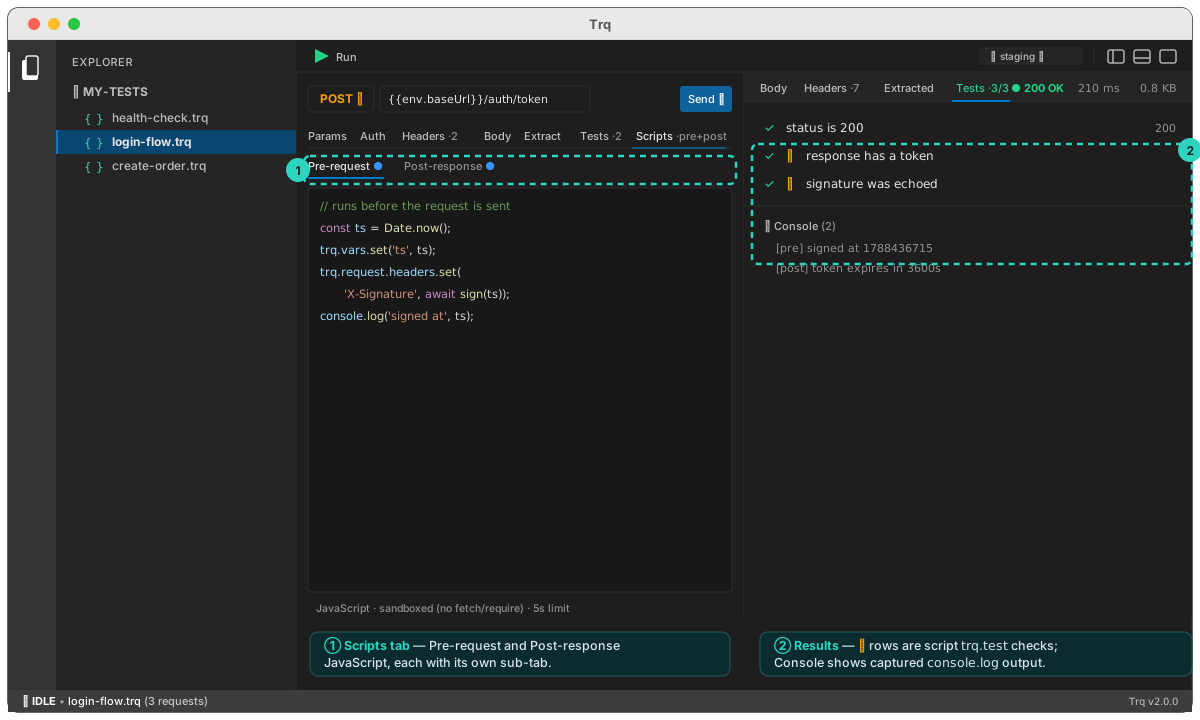
Everything runs in Trq's own runtime — identically in Studio and the CLI — so a scripted test behaves the same on your machine and in CI.
Write a pre-request script
- Select a request and open its Scripts tab.
- Make sure the Pre-request sub-tab is active (it's the default).
- Write JavaScript against the
trqobject. This example stamps a timestamp, saves it for templating, and signs the request:
// runs before the request is sent
const ts = Date.now();
trq.vars.set('ts', ts);                 // now usable as {{var.ts}} in this request

// derive an HMAC signature over the timestamp + path
const key = await crypto.subtle.importKey(
  'raw', new TextEncoder().encode(trq.env.get('signingSecret')),
  { name: 'HMAC', hash: 'SHA-256' }, false, ['sign']);
const mac = await crypto.subtle.sign('HMAC', key,
  new TextEncoder().encode(ts + trq.request.url));

trq.request.headers.set('X-Timestamp', String(ts));
trq.request.headers.set('X-Signature', btoa(String.fromCharCode(...new Uint8Array(mac))));
console.log('signed at', ts);
- Press Send (or Run the case). The request goes out with the header the script added — and the Console strip under the response Tests tab shows your
console.logoutput.
Because the pre-request script runs before {{...}} are resolved, a value you trq.vars.set('ts', …) in the script is available as {{var.ts}} in that same request's URL, headers, or body. This is what makes "compute a value, then send it" a one-step move.
Write a post-response script
- On the same Scripts tab, switch to the Post-response sub-tab.
- Read the response through
trq.response, then extract values and assert:
const data = trq.response.json;               // parsed body (undefined if not JSON)

// derive a variable for later requests in the case
trq.vars.set('token', data.accessToken);

// scripted assertions — each becomes a row in the Tests results
trq.test('token is present', () => trq.expect(data.accessToken).toBeDefined());
trq.test('responded quickly',  () => trq.expect(trq.response.durationMs).toBeLessThan(1500));
- Send again. In the response Tests tab, your checks appear alongside any declarative rows, each marked with a ⚡ so you can tell scripted checks from Tests-tab rows. A variable you set with
trq.vars.set(...)is now usable as{{var.token}}in later requests — the same chaining model, driven by code.
Session-level scripts
Need the same logic on every request — attach an auth header everywhere, or assert no response is ever a 5xx? Put it once at the session level instead of pasting it into each request.
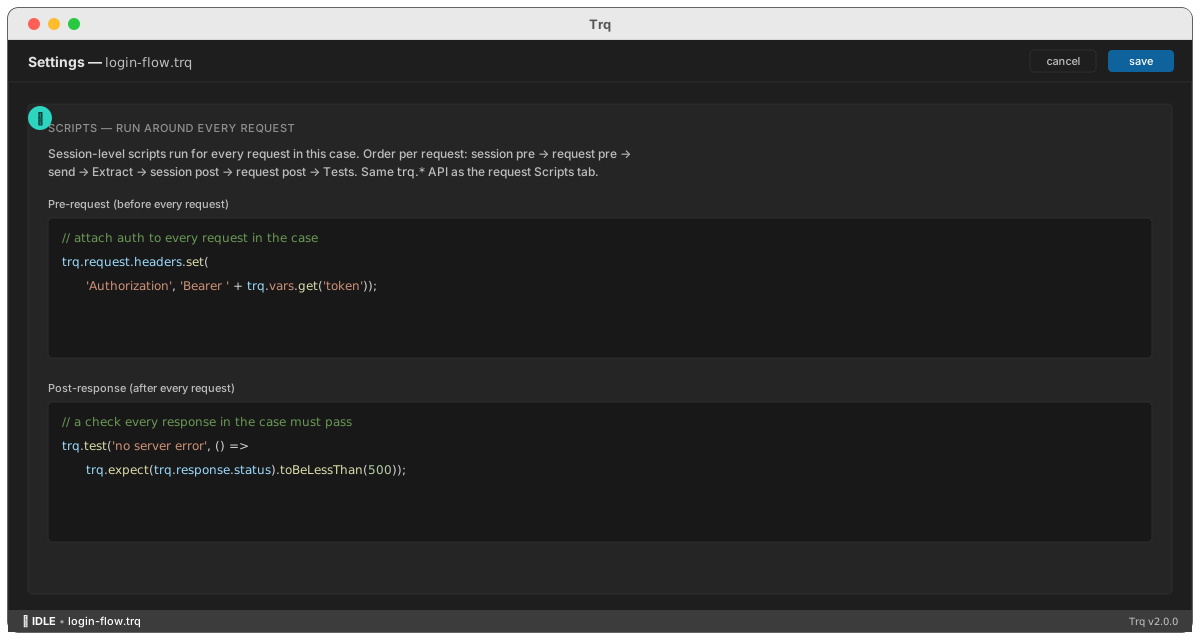
- Open the API session's Settings (the ⚙ icon).
- Fill in Pre-request and/or Post-response under Scripts — run around every request.
- Save.
Session scripts wrap each request's own. The full order per request becomes:
session pre → request pre → templating → send → Extract → session post → request post → Tests
The trq API
Available in both scripts
trq.vars.get / set / has / unset | The run's variable scope — the same store as {{var.*}} and Extract. Values are strings. |
trq.env.get('name') | Read a value from the active environment. |
trq.template(str) | Resolve {{var.*}} / {{env.*}} / {{uuid}} in a string, using the current run. Handy in a pre-request script to read the fully-templated body before signing or encrypting it (pre-scripts run before the built-in templating). |
console.log / warn / error | Captured per step and shown in the response Console strip. |
Standard JavaScript is available (JSON, Math, Date, URL, RegExp, …) plus crypto (WebCrypto — crypto.subtle for signing and encryption), btoa / atob, and TextEncoder / TextDecoder. Top-level await works.
Pre-request only
trq.request.url · .method · .body | Read/write. Assigning an object to .body JSON-stringifies it. |
trq.request.headers.get / set / remove | Header rows (case-insensitive). .all() lists the enabled rows. |
trq.request.params.get / set / remove | Query-string rows. |
trq.skip('reason') | Skip this step — reported as skipped (⊘), not a failure. |
Post-response only
trq.response.status · .durationMs · .headers · .text | The completed response (read-only). |
trq.response.json | Body parsed once; undefined when the body isn't JSON. |
trq.response.body = … | Rewrite the response body — e.g. decrypt it. The new text then feeds the Extract rows, the Tests, and the response pane, so an encrypted transport becomes transparent to the rest of the step. |
trq.test('name', fn) | A scripted assertion — fn throwing (or returning false) fails the row. Shows in the Tests results marked ⚡. |
trq.expect(actual) | Matcher sugar for inside trq.test: .toBe · .toEqual · .toContain · .toMatch · .toBeGreaterThan · .toBeLessThan · .toBeTruthy · .toBeDefined. |
More examples
Skip a step conditionally (pre-request):
if (!trq.vars.get('orderId')) trq.skip('no order created earlier in this run');
Build a dynamic body (pre-request):
trq.request.body = JSON.stringify({
  requestId: crypto.randomUUID(),
  items: [{ sku: trq.vars.get('sku'), qty: 2 }],
});
Validate every item in a list (post-response):
const { items } = trq.response.json;
trq.test('all items have an id', () => {
  for (const it of items) trq.expect(it.id).toBeDefined();
});
Decrypt an encrypted response (post-response) — the pre-request script encrypted the body and saved the session key; here we reverse it:
const b64 = (s) => Uint8Array.from(atob(s), (c) => c.charCodeAt(0));
const hex = (h) => Uint8Array.from(h.match(/../g).map((x) => parseInt(x, 16)));

const [ivHex, cipherHex, tagHex] = JSON.parse(trq.response.text).split('::');
const sealed = new Uint8Array([...hex(cipherHex), ...hex(tagHex)]);
const key = await crypto.subtle.importKey('raw', b64(trq.vars.get('sessionKey')),
  { name: 'AES-GCM' }, false, ['decrypt']);
const plain = new TextDecoder().decode(
  await crypto.subtle.decrypt({ name: 'AES-GCM', iv: hex(ivHex), tagLength: 128 }, key, sealed));

// hand the plaintext back — Extract rows and Tests now run on the JSON
trq.response.body = plain;
trq.test('response decrypts', () => trq.expect(plain.length).toBeGreaterThan(0));
Put the encrypt in a session-level pre-request script and the decrypt in a session-level post-response script (Settings → Scripts), and every request in the case is encrypted going out and decrypted coming back — while your per-request Body, Extract, and Tests keep working on plain JSON. Make the pre-script encrypt trq.template(trq.request.body) so {{var.*}} resolve first, and have the post-script pass non-encrypted or error responses through untouched.
Failure semantics
- A script that throws (or times out) fails the step — the reason reads
pre-request script: …orpost-response script: …— and stops the case, like a network error. - A
trq.testfailure is just a failing assertion row: the step fails and the row shows red, but other tests in the same script still run. trq.skipends the step successfully without sending (⊘ in the run output).
Limits
Scripts run sandboxed with a 5-second budget each. There is deliberately no fetch, require, or filesystem access — a request belongs in the request list where it's visible, replayable, and reported. Console output is capped per step.
Next: run the whole case and read the report.