Retry and polling
Two settings share the Retry tab because both answer "what happens when this does not go well". They are not the same thing, and the difference decides which one you want:
- Retry is for a request that failed. The connection was refused, the gateway returned 502, the rate limiter said 429.
- Polling is for a request that succeeded and said "not yet". An async job that answers
status: "pending"eight times has not failed eight times.
Reporting a polled job as eight failures sends somebody hunting a bug that is not there, which is why they stay separate.
Retry
Step by step
1. Open the Retry tab and set attempts
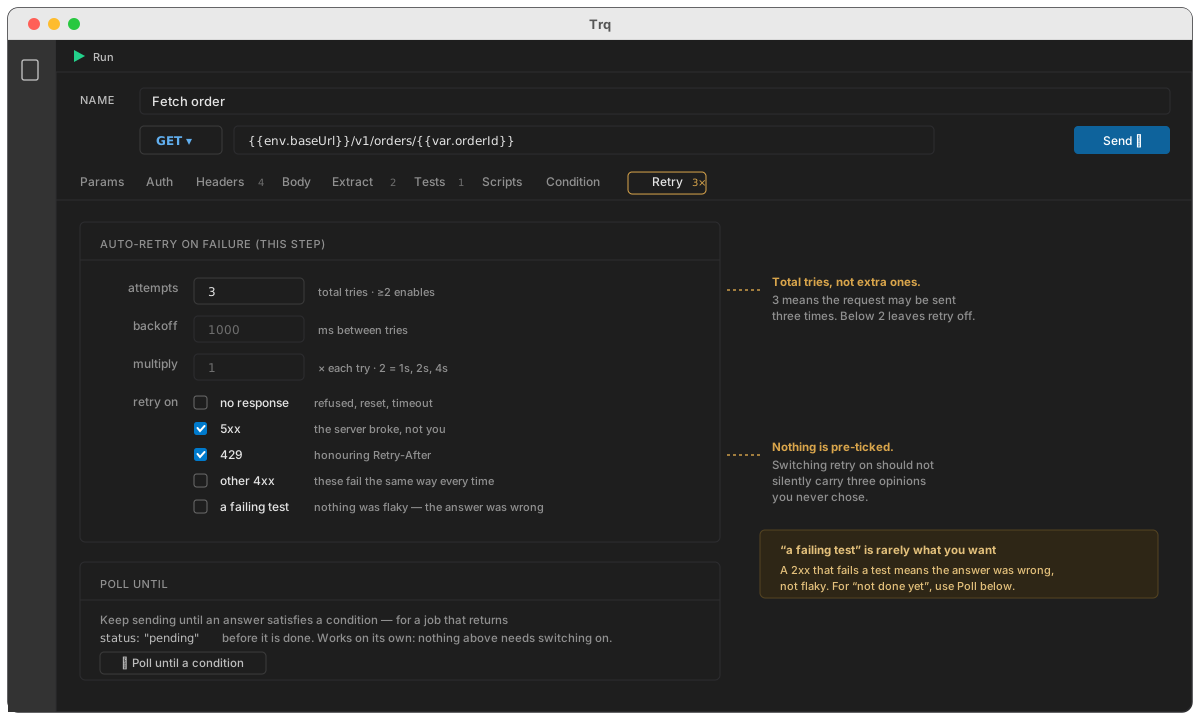
Select a request, open Retry, and set attempts. This is total tries, not extra ones: 3 means the request may be sent three times. Anything below 2 leaves retry off, which is the default.
Until you set it, the tab shows one field. The rest appears once retry is actually on — a wall of options is how a simple setting stops looking simple.
2. Choose which failures are worth repeating
Nothing is retried until you tick something. All five conditions are opt-in:
| Condition | Repeats when | Use it for |
|---|---|---|
| no response | refused, reset, timeout — no HTTP status at all | the commonest flake there is; the request may never have reached the server |
| 5xx | the server returned 500–599 | a gateway or a dependency having a moment |
| 429 | rate limited | bursty suites; see Retry-After below |
| other 4xx | 400–499 | rarely useful — these fail the same way every time |
| a failing test | the response arrived and a test in the Tests tab failed | see the caution below |
:::caution "a failing test" is usually not what you want A 2xx that fails a test means the answer was wrong, not flaky. Sending it again three times usually gets the same wrong answer three times. If what you actually mean is "the job is not done yet", you want polling, further down this page. :::
:::note Why nothing is pre-ticked An earlier version pre-selected no response, 5xx and 429 on the grounds that those are what the status codes mean. True — and it meant switching retry on silently carried three opinions nobody chose. A test runner that repeats requests should do it only where you asked. :::
If you set attempts and tick nothing, the tab says so, because attempts: 3 sitting there repeating nothing is the worst of both.
3. Set the wait, if the default does not suit
- backoff — milliseconds between tries. Default
1000. - multiply — multiplies the wait each try.
1(default) is a fixed wait;2gives 1s, 2s, 4s.
With 429, the server's own Retry-After header wins over your backoff — ignoring it is how a 1s/2s/4s schedule turns into three more 429s. Both legal forms are read, seconds and an HTTP date, and a hostile or mistaken value is capped at a minute so one header cannot hang a suite for a day.
:::caution POST and PUT Retrying a POST after a timeout may create a second record: the request can reach the server even when the answer does not come back. Trq warns on the tab when you tick no response on a POST or PATCH. If the endpoint is not idempotent, leave that one off. :::
Seeing that it happened
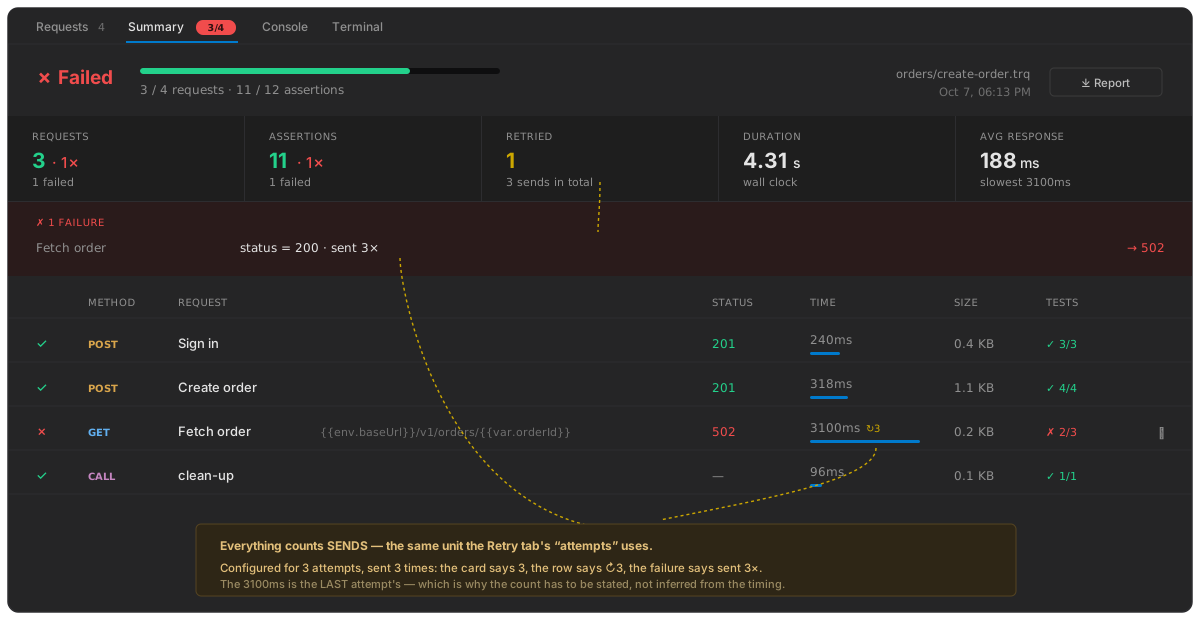
Everything counts sends, the same unit attempts uses. A request configured for 3 attempts and sent 3 times reads 3 everywhere:
| Where | Shows |
|---|---|
| the request row, beside the duration | ↻3 |
| the Summary's Retried card | 1 request, 3 sends in total |
| the failure line | status = 201 · sent 3× |
| the exported report | the same, in the summary, the row and the detail |
| while it runs | ↻ send 2 of 3 on the row, during the wait |
The duration you see is the last attempt's, not the total — which is exactly why the count has to be stated rather than inferred from the timing.
Polling
Polling keeps sending until an answer satisfies a condition. It is for the shape every async API has:
POST /v1/exports        →  202  { "jobId": "e_19f3", "status": "pending" }
GET  /v1/exports/e_19f3 →  200  { "status": "pending" }
GET  /v1/exports/e_19f3 →  200  { "status": "pending" }
GET  /v1/exports/e_19f3 →  200  { "status": "complete", "url": "…" }
Step by step
1. Open the Retry tab and press + Poll until a condition
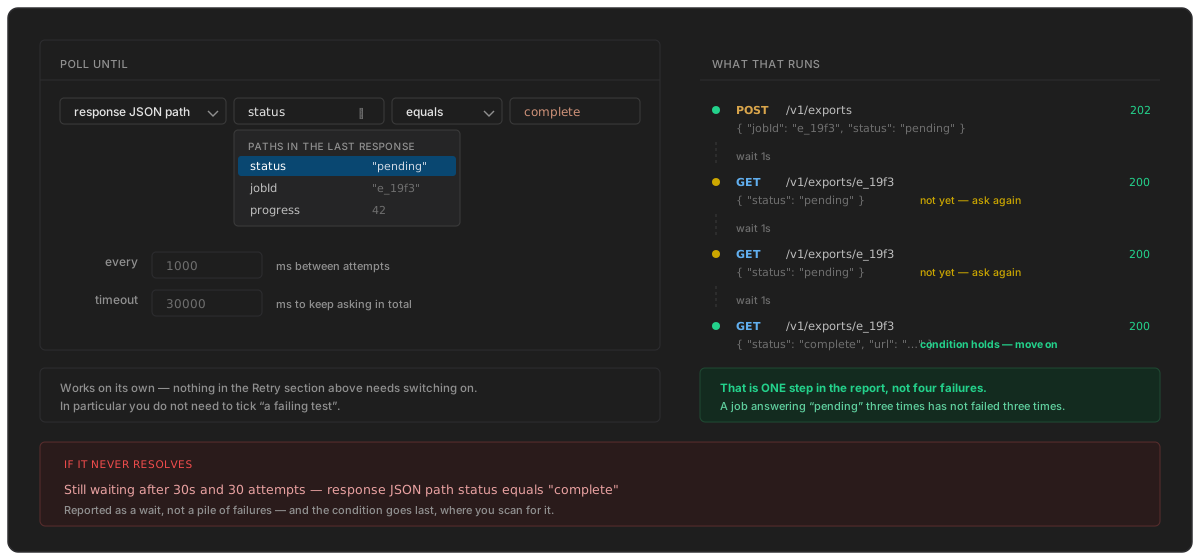
Polling works on its own. Nothing in the Retry section above needs switching on — in particular you do not need to tick a failing test.
2. Build the condition
The editor is the Condition tab's, control for control: the same sources, the same suggester fed by the paths found in the last response, the same operator wording.
For the example above:
| source | response JSON path |
| path | status |
| operator | equals |
| value | complete |
Only three sources are offered — response status, response JSON path, response header. A variable is not one of them: polling asks about the response it just got, and a variable is not that.
3. Set how often and how long
- every — milliseconds between attempts. Default
1000. - timeout — how long to keep asking in total. Default
30000.
4. What a timeout reports
A poll that never resolves is reported as a wait, not as a pile of failures:
Still waiting after 30s and 30 attempts — response JSON path status equals "complete"
Nothing failed thirty times. The answer never arrived, and the condition is stated last, where you scan for it.
Using both together
They compose, and the order is the useful one: a poll attempt that fails is retried by the rules above; one that succeeds without satisfying the condition just waits and asks again.
So a job that is both flaky and slow — the first two calls 502 while the service warms up, then pending for a while, then complete — needs 5xx ticked for the warm-up and a poll condition for the wait. Neither setting alone handles it.
Where retry settings live
Per request, on its Retry tab. A case-wide default — set it once, every request inherits it — is designed but not shipped.
See also
- Conditions — the same editor, deciding whether a request runs at all
- Assertions — the tests that a failing test reacts to
- Running a case — what the Requests panel shows during a run