Building requests
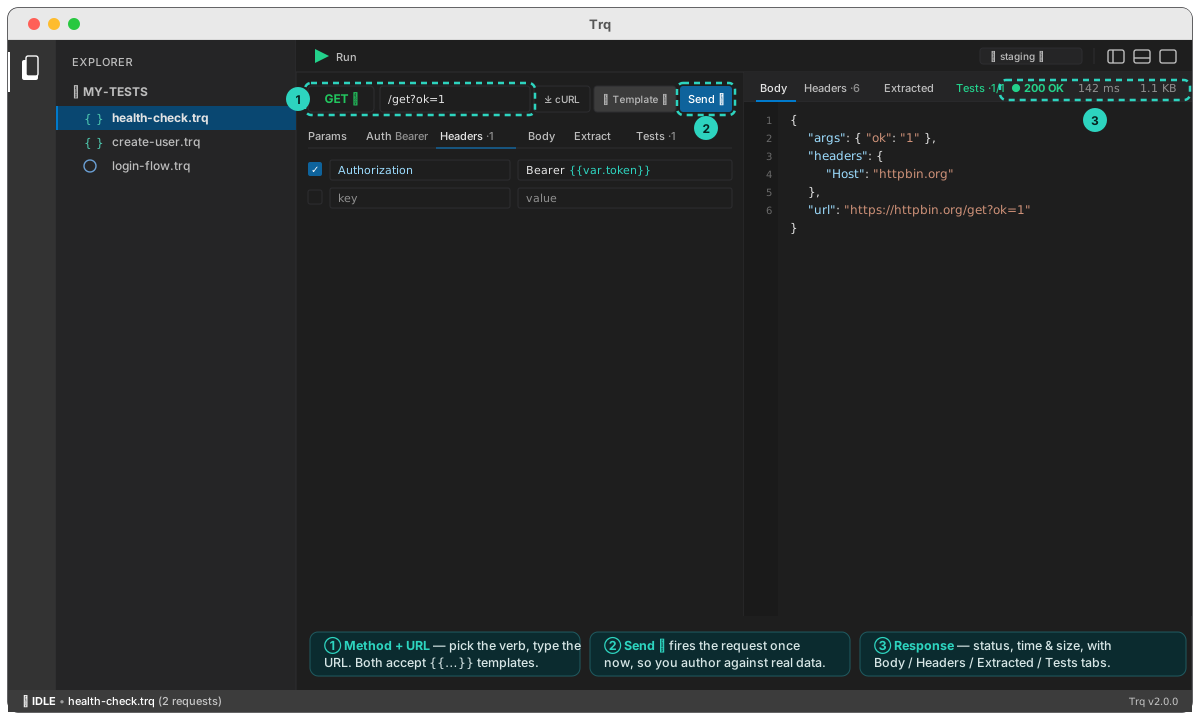
Every request in an API session is built the same way: a method, a URL, and optional params, headers, auth, and body in the tabs below. Everything is templatable — anywhere you can type, you can drop a {{...}} token.
Method & URL
Click the method chip to choose the verb — GET, POST, PUT, PATCH, or DELETE. Each is color-coded so a list of requests reads at a glance.
Type the full URL in the bar next to it. The URL accepts templates, so a base can come from an environment:
GET {{env.baseUrl}}/users/{{var.userId}}
Three buttons sit at the end of the URL bar, in order: ⤓ cURL, + Template ▾, and Send ▸.
Query params
Open the Params tab to add ?key=value pairs as rows instead of hand-editing the URL. Each row has an enable checkbox, a key, and a value (templatable). Disabled rows stay in the list but aren't sent — handy for toggling an optional filter. Params you add here and any already in the URL are merged when the request fires.
Headers
The Headers tab is a key/value list, with autosuggest for common header names and values as you type — start typing Con… and pick Content-Type, then application/json. Values are templatable, so an auth header can reference a captured token:
Authorization: Bearer {{var.token}}
For the standard auth schemes, prefer the Auth tab — it materializes the right header (or query param) for you.
Insert a template
The + Template ▾ button (on the URL bar, and on the Body tab strip) opens a menu of everything you can reference — reusable variables like {{uuid}} and {{timestamp}}, captured variables under a Captured category, and environment values — so you click to insert instead of remembering names. Typing {{ opens the same menu inline.
Import from cURL
Already have a request as a curl command — copied from your terminal, an API doc, or a browser's Copy as cURL? Click ⤓ cURL, paste it, and Import. Trq fills the method, URL, headers, and body from the command, so you don't rebuild it by hand.
Reorder requests
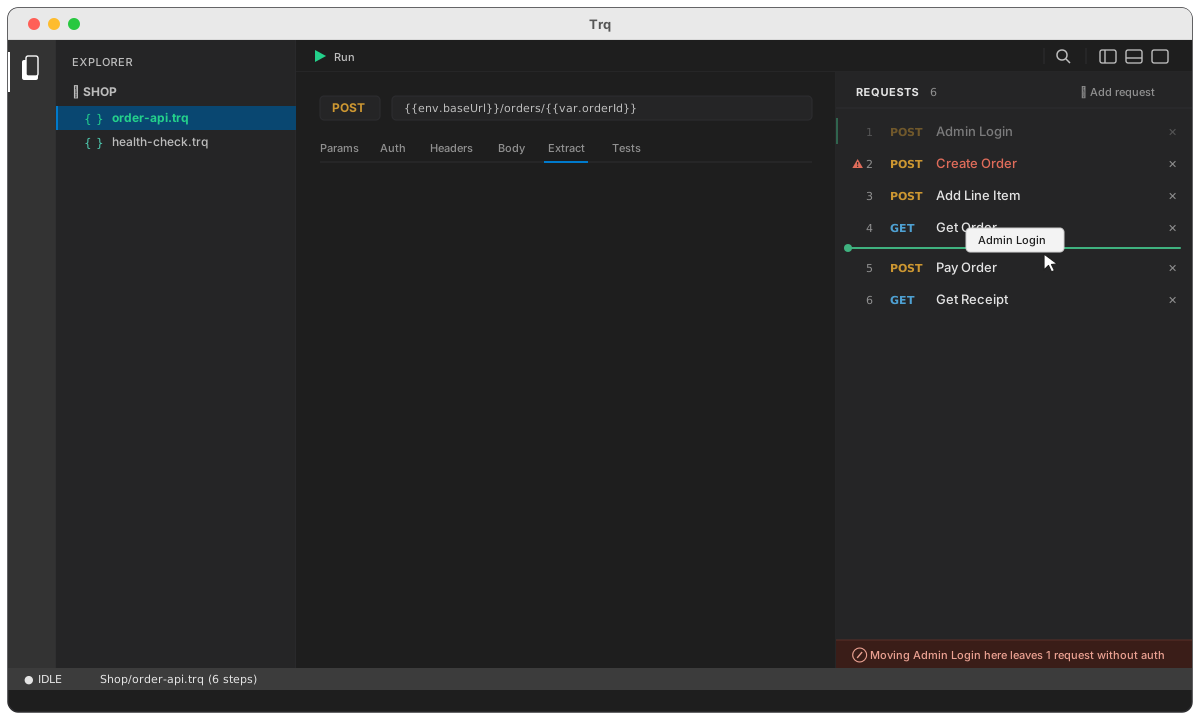
Requests run in list order, so the order is the test. Drag a row in the Requests panel to move it — a green line shows where it will land, and the row you picked up keeps a green edge so you can see where it came from. Release anywhere in the list, including the empty space below the last row.
Reordering is available in API sessions only. A recorded web or mobile journey is a sequence of things that actually happened in a browser or on a device; shuffling it would produce a journey that never occurred. An API case is a list you assemble, so it is yours to arrange.
What the drag tells you
An API case is usually a chain: one request extracts a token, the next spends it. Move a request above the one that produces a value it needs and the run does not stop at the gap — the unresolved {{var.token}} is sent as literal text, and the case fails later on a confusing 404 that points nowhere near the move.
So the drag says what it costs before you let go:
- The drop line is always green. It answers where will this land — and it always lands. Whether the move is a good idea is a separate question, answered separately.
- Affected requests turn red with a
⚠badge, live, as you drag. Hover one to see which values it can no longer resolve. - The footer names the damage — "Moving Admin Login here leaves 1 request without auth" — or confirms a safe move: "Release to move Admin Login after Get Order".
Nothing stops you dropping it. A reorder that breaks the chain is sometimes a step on the way to a bigger rearrangement, and you can always drag it back.
The red marks stay after the drop, so a case left mid-rearrangement still shows what is unresolved. They clear when you fix it — by moving the producer earlier, or by adding the extract the request needs.
Only the difference is reported. A case that is already missing a value — half-built, or reading something you set outside the session — doesn't light up on every drag.
Reordering is disabled while a case is running. Execution renumbers step ids, and moving a row underneath a run in progress would attach its results to the wrong request.
Delete a request
The ✕ on a row, or Delete in its right-click menu, removes a request.
If nothing else depends on it, that's a plain confirmation. If other requests read a value this one produces, you get the full picture first: which requests break, the value each one loses, and the step number it will have once the delete goes through.
There is no undo for a delete. ⌘Z covers edits inside a request — a header you changed, a body you reformatted — but adding, deleting or reordering requests renumbers every step id, which clears that history. So the warning is the only chance to see what the delete costs.
Send vs Run
- Send ▸ fires this one request immediately and shows its response — that's for authoring: you see real data while you build, so you know what to assert on or extract.
- ▶ Run (in the toolbar) replays every request in the session as a case, passing variables down the chain. See Running a case.
Next: add authentication, pick a body type, or chain requests with variables.