Import from OpenAPI
If the service you are testing publishes an OpenAPI document, you do not have to retype it. Trq reads the spec and writes the requests: URL, method, query parameters, headers, an example body, the declared auth, and a test that the status matches what the spec promises.
Both OpenAPI 3.x and Swagger 2.0 are supported, as JSON or YAML, from a file, a URL, or pasted text.
There are two ways in, for two different jobs:
| You want | Use | Starts from |
|---|---|---|
| A folder of runnable cases from a whole document | Import from OpenAPI… | right-click a folder in the file tree |
| One endpoint added to the case you are building | + Add step ▾ → From spec… | inside a case |
Step by step: import a whole document
1. Right-click a folder → Import from OpenAPI…
Bulk import starts from the tree because it creates files. Right-click the folder you want them in.
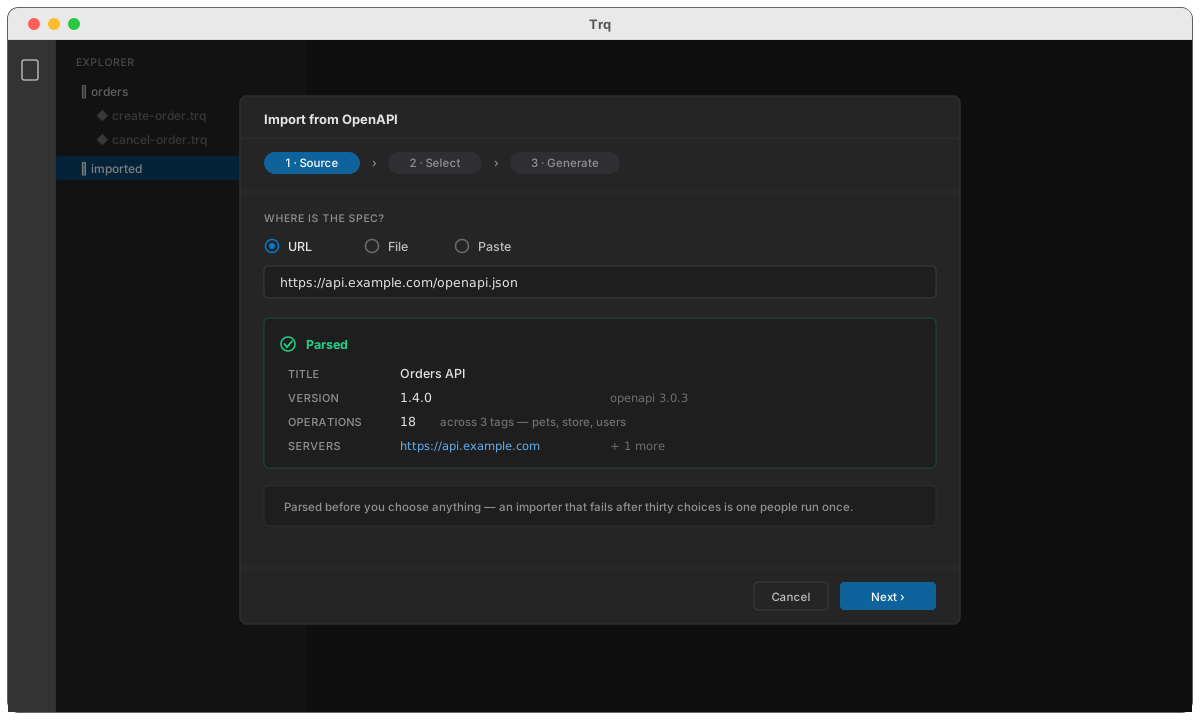
2. Point it at the document
Choose URL, File or Paste, and give it the source:
https://api.example.com/openapi.json
Trq parses it immediately and tells you what it found — the title, the version, how many operations, and which servers it declares. Parsing happens before you make any choices, so a document Trq cannot read fails here rather than after you have picked thirty endpoints.
If the document declares an auth scheme Trq cannot honour (oauth2 with an implicit or authorization-code flow, or openIdConnect), it says so now rather than generating twenty requests that all return 401.
3. Pick the operations
Step two lists every operation, grouped by its tag — the grouping the spec's own authors chose. Tick the ones you want; the tag headers select a whole group at once.
Deprecated operations are marked, and there is a search box for documents with hundreds of endpoints.
4. Choose what to generate
Step three is about what each request should contain:
- Group into sessions by tag (default) — one
.trqper tag, its operations in document order, each file runnable on its own as a smoke test. Or a single session for all of them. - Generate a status test — every request gets a
status equals <declared>test in its Tests tab. - Generate a schema test — where the spec declares a response schema, add a
matches schemacontract test. This is the one that turns a spec into a real contract check with nothing else to wire. - Create environments from
servers— a spec'sserverslist is usually dev/staging/prod in disguise. Ticking this writes one environment per server withbaseUrlset, which is what lets the imported tests survive contact with a second environment instead of being pinned to whichever host came first.
Press Import.
5. What you get
orders/
  pets.trq        ← tag: pets        (6 requests)
  store.trq       ← tag: store       (4 requests)
  users.trq       ← tag: users       (8 requests)
Open any of them and press ▶ Run.
Each request arrives with:
- URL —
{{env.baseUrl}}plus the path, with{id}rewritten as{{var.id}}. OpenAPI templating is single braces and Trq's is double; importing a path verbatim would request a literal/orders/%7Bid%7Dand 404 with no explanation. - Query parameters and headers — required ones enabled, optional ones present but switched off. Discoverable without being sent.
- Body — an example built from the request schema, with
$refs resolved (including nested ones, and self-referencing schemas without hanging). - Auth — if the operation names a scheme the spec declares and Trq supports, the Auth tab is filled in.
- Tests — the status test, and the schema test if you asked for one.
The document is also registered with the project, which is what makes the next two sections possible.
Step by step: add one endpoint to a case
You are building a case and need one more call. You do not want another file.
1. + Add step ▾ → From spec…
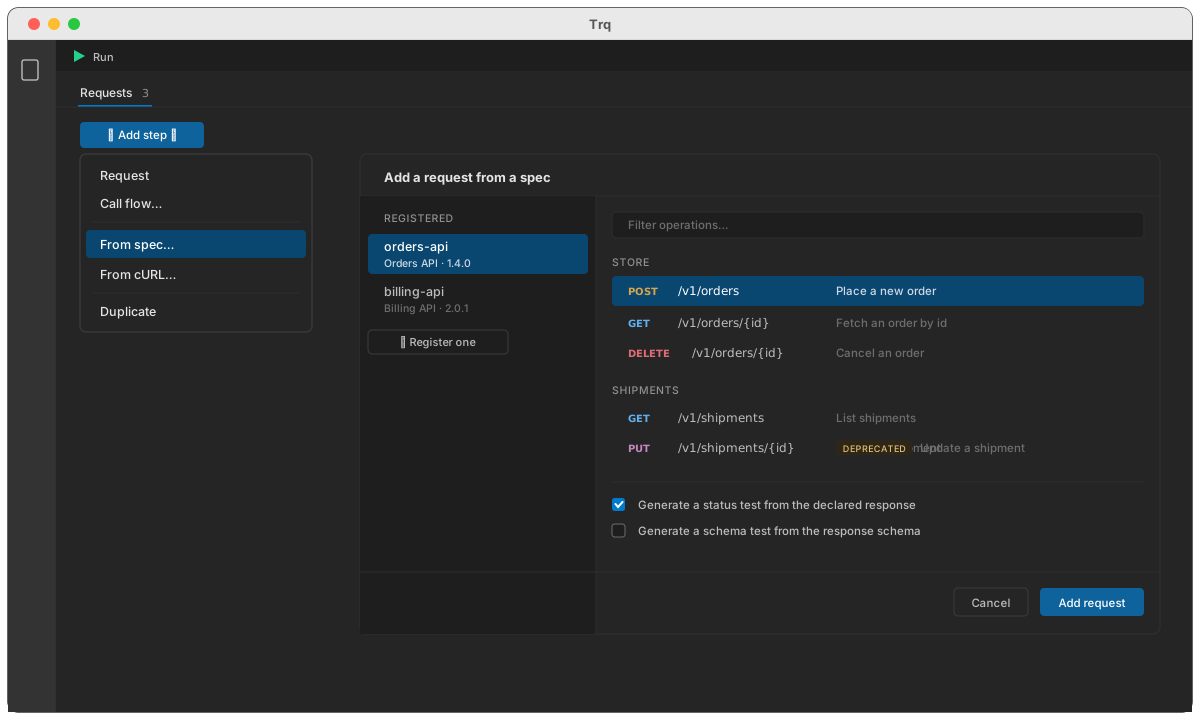
2. Pick a registered document, then an operation
The picker lists the specs registered with this project. If none is, the same dialog will register one — you do not get bounced to a different screen to do it.
3. It lands where you were
The request is inserted at the position you chose, built exactly as the bulk import builds one. Everything is editable afterwards; nothing about a request remembers it came from a spec except the small stamp that makes spec sync possible.
Importing over an open request
Inside the builder, Import offers the same two sources — a cURL command or an OpenAPI operation — and overwrites the request you have open rather than making a new one.
It is a single edit, so CmdZ undoes the whole import rather than one field of it. The dialog lists exactly which fields it will replace; your request's name, Extract rows, Scripts and Condition are not among them and survive untouched.
Known gap: relative server URLs
A spec whose servers entry is a path rather than a full URL —
servers:
  - url: /api/v3
— has no host in it. Trq writes it into the environment as-is, so baseUrl becomes /api/v3 and the request is not sendable until you edit the environment to a real host. You will get a clear message rather than a cryptic URL error, but it is a manual fix for now.
See also
- Check for spec changes — what to do when the document moves on
- Environments — the
baseUrlthe imported requests use - Assertions — the status and schema tests the import generates