Environments
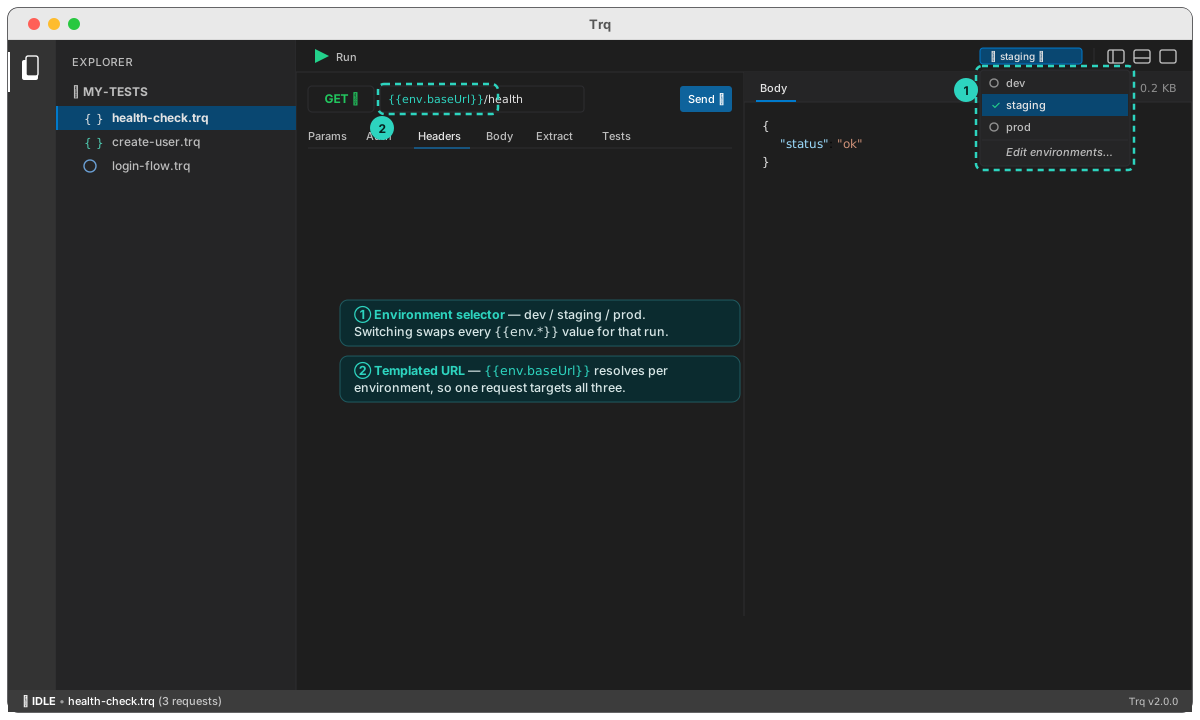
The same API case should run against dev, staging, and prod without editing a single request. Trq does that with environments: a named set of values you reference as {{env.NAME}}, switched from one dropdown in the toolbar.
Templatize what changes
Anywhere the target differs per environment — the base URL, an API key, a tenant id — use an {{env.*}} token instead of a literal:
GET  {{env.baseUrl}}/health
X-Api-Key: {{env.apiKey}}
Switch the target
The environment selector sits in the toolbar. Pick dev, staging, or prod and every {{env.*}} token resolves to that environment's values for the next Send or Run — the requests themselves never change. Open Edit environments… to add environments and set their values.
This is the same environments feature the web and mobile sessions use, so a project's dev/staging/prod definitions are shared across all three targets.
{{env.*}} values are fixed per environment; {{var.*}} values are captured live during a run. A request can use both — e.g. {{env.baseUrl}}/users/{{var.userId}}.
Next: assert on responses, or run the case in CI against a chosen environment.