Call flows
Most API cases begin the same way. Fetch a token. Create the record the test is about. Afterwards, delete it again. Copy those three requests into twelve cases and you have twelve copies to fix when the login endpoint changes.
A call flow is one request, or a run of them, kept in its own .trq file and called from other cases as a single step. One copy, one place to fix, and the caller stays readable: it shows what it is testing, not how it signs in.
This is the same idea as a call flow in a web or mobile session, and it works the same way — a flow is an ordinary session file, so you can open it, run it on its own, and watch it in the Requests panel.
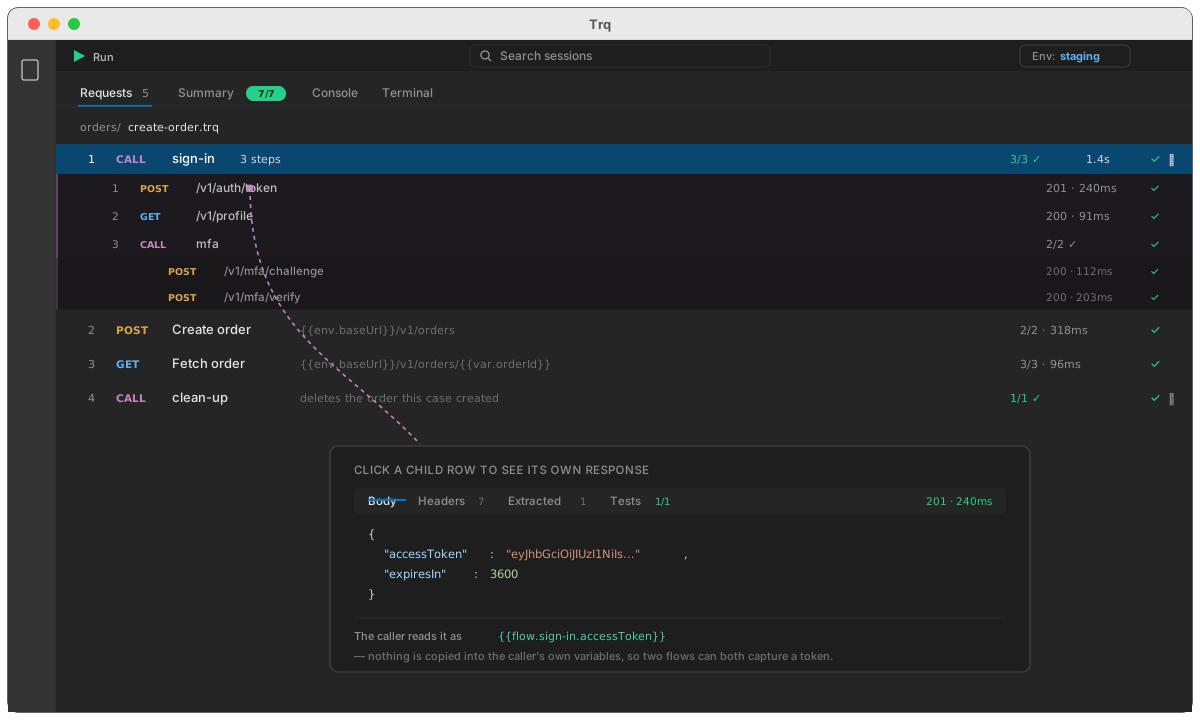
Step by step: extract a sign-in into a flow
Say a case starts with two requests that every other case also needs:
| # | Request | What it does |
|---|---|---|
| 1 | POST /v1/auth/token | exchanges credentials for an access token |
| 2 | GET /v1/profile | confirms the token works and captures the account id |
| 3 | POST /v1/orders | the thing this case is actually about |
1. Select the requests to extract
In the Requests panel, click request 1, then Shift-click request 2. Both rows highlight. Selection works exactly as it does in a web session — Cmd-click (Ctrl on Windows) adds one row at a time, Shift extends a range.
The steps you extract must be next to each other. Trq will refuse a selection with a gap in it, because a flow is a run of steps, not a basket of them.
2. Right-click → Extract to flow…
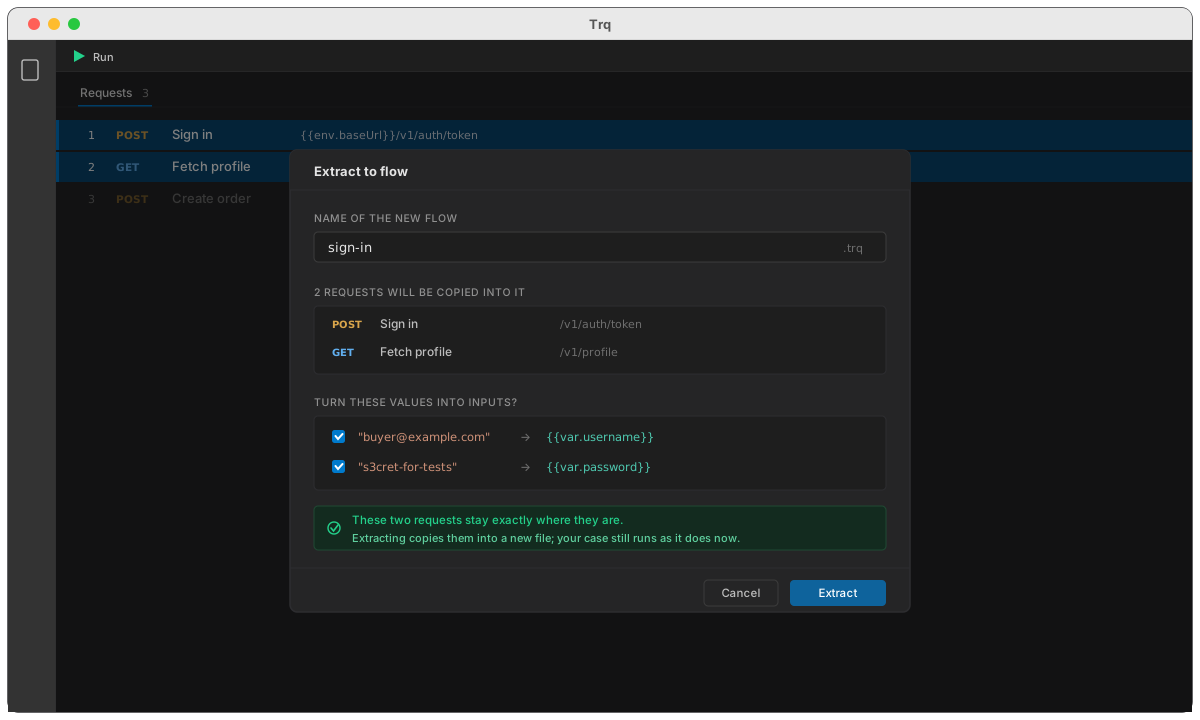
Give the flow a name — sign-in, say. The dialog lists exactly what is going into it.
3. Nothing is removed
This is the part worth reading twice. Extracting does not delete the steps from your case. It copies them into a new sign-in.trq beside it and leaves your case exactly as it was, still running and still green.
That is deliberate. Harvesting a reusable flow out of a journey that works should not change what the journey does, and if the flow comes out wrong you have lost nothing. Adding the Call flow step is a separate decision you make next.
Web and mobile sessions behave the same way.
4. Replace the originals with a call
Now select the two original requests and delete them, then add the call in their place:
- Press + Add step ▾ above the Requests panel.
- Choose Call flow….
- Pick
sign-in.trq.
The row appears as ↳ call sign-in. Run the case: it fetches the token and the profile exactly as before, and the Requests panel shows one row where there were two.
Reading what a flow returned
A call row is not a black box. After a run, click the ▸ on the row to expand it:
- every request the flow ran, in order, with its status and timing
- a ✓ or ✗ per child request, and an aggregate on the call row itself (
3/3 ✓) - click any child row to see that request's response body, headers, extracted variables and tests
A flow called from inside a flow expands too, as deep as it goes.
Using a flow's variables
A flow has its own variables. Nothing it captures leaks into the caller by accident — which is what lets two different flows both capture something called token without colliding.
To read one, use the flow's alias:
{{flow.sign-in.accessToken}}
The alias defaults to the flow's filename. You can give a call row its own alias when you add it, which matters when one case calls the same flow twice:
{{flow.buyer.accessToken}}
{{flow.seller.accessToken}}
:::caution Two calls, one alias If both calls fall back to the filename, they share a name and the second overwrites the first. Give at least one of them an explicit alias. :::
Passing values in
A call row can supply inputs — values the flow reads as {{var.name}}:
| Input | Value |
|---|---|
username | buyer@example.com |
password | {{env.buyerPassword}} |
Inputs are resolved against the caller's scope before the flow starts, so {{env.*}} and {{var.*}} mean what they mean where you typed them.
When you extract a flow, Trq offers to promote the literal values it finds into inputs for you — so a hard-coded email in the original request becomes {{var.username}} inside the flow, with the original value handed back as the input to supply.
Settings are per file
A flow is a session, so it carries its own Settings: its own session-level pre/post scripts, its own environment selection. A flow does not inherit the caller's.
That is on purpose. A shared sign-in flow that behaved differently depending on which case called it would be the hardest kind of test to debug.
What a flow cannot do
- It cannot call itself. A cycle is caught before the run starts and reported as
circular call-flow: a.trq → b.trq → a.trq. - It cannot nest more than ten deep.
- It must be an API session. A flow made of web or mobile steps fails the call with a clear message rather than running the requests it happens to contain and silently skipping the rest.
- A missing flow fails loudly. A call pointing at a file that no longer exists fails the step. A reusable flow that quietly does nothing is worse than one that errors, because the case still passes.
Renaming and deleting
Renaming a flow repoints every call row that referenced it, across the whole project — the reference is a path, and nothing else would update it.
Deleting one that is still called warns you first, and names the cases that call it.
See also
- Variables —
{{var.*}}, capture and reuse - Environments —
{{env.*}}per environment - Running a case — what the Requests panel shows during a run