Request bodies
For requests that send data — POST, PUT, PATCH — the Body tab picks what to send. Choose a type from the radio row, and Trq sets the matching Content-Type for you.
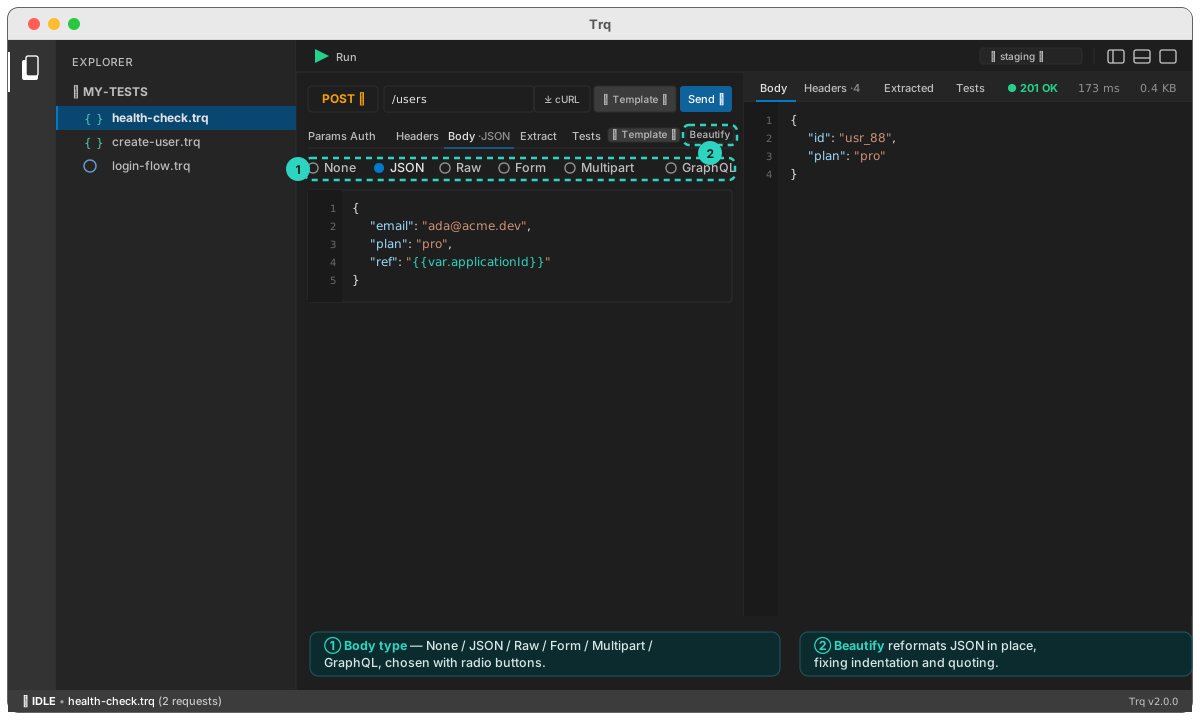
Body types
- None — no request body (the default for
GET/DELETE). - JSON — a JSON editor with line numbers; sent as
application/json. Values are templatable —"ref": "{{var.applicationId}}". Hit Beautify to reformat, or + Template ▾ to insert a token. - Raw — any text, sent verbatim; you control the
Content-Typevia a header. - Form — key/value rows sent as
application/x-www-form-urlencoded. - Multipart — key/value rows sent as
multipart/form-data, where each field is either Text or a File. Pick a file and Trq adds it to the project's file pool so the upload replays anywhere, including CI. Great for upload endpoints. - GraphQL — a Query field and a Variables (JSON) field, sent as a JSON
POSTof{ query, variables }withContent-Type: application/json.
Beautify
On the JSON and Raw editors, Beautify reformats the body in place — fixing indentation and quoting. It parses strict JSON first, then falls back to a lenient normalize (unquoted keys, single quotes, trailing commas) so a pasted-in snippet still tidies up; if it truly can't parse, it tells you rather than mangling the text.
Content-Type
Each body type sets its own Content-Type, so you don't add one manually — except Raw, where you set it yourself. For Multipart, Trq lets the runtime write the multipart/form-data boundary, so don't override it by hand.
Next: assert on the response, or extract values to chain into the next request.
Syntax colouring
A JSON body is coloured as you type — keys, strings, numbers and true/false/null each take their own colour, matching the Scripts tab rather than introducing a second palette.
{{var.x}} and {{env.x}} tokens get a colour of their own even inside a string. In a Trq body a quoted "{{var.MERCHANT_ID}}" isn't a string literal — it's the one part of the line that will differ at run time, and it's what you scan for.
The response pane is coloured the same way. Very large bodies (over 256 KB) are shown plain: colouring them would cost more than it's worth to read.