Assertions
An assertion turns a request from "it returned something" into a real test. Each request carries its own list in the Tests tab; they're checked automatically after every Send and every Run, and each row shows a green ✓ or red ✗ with the actual value.
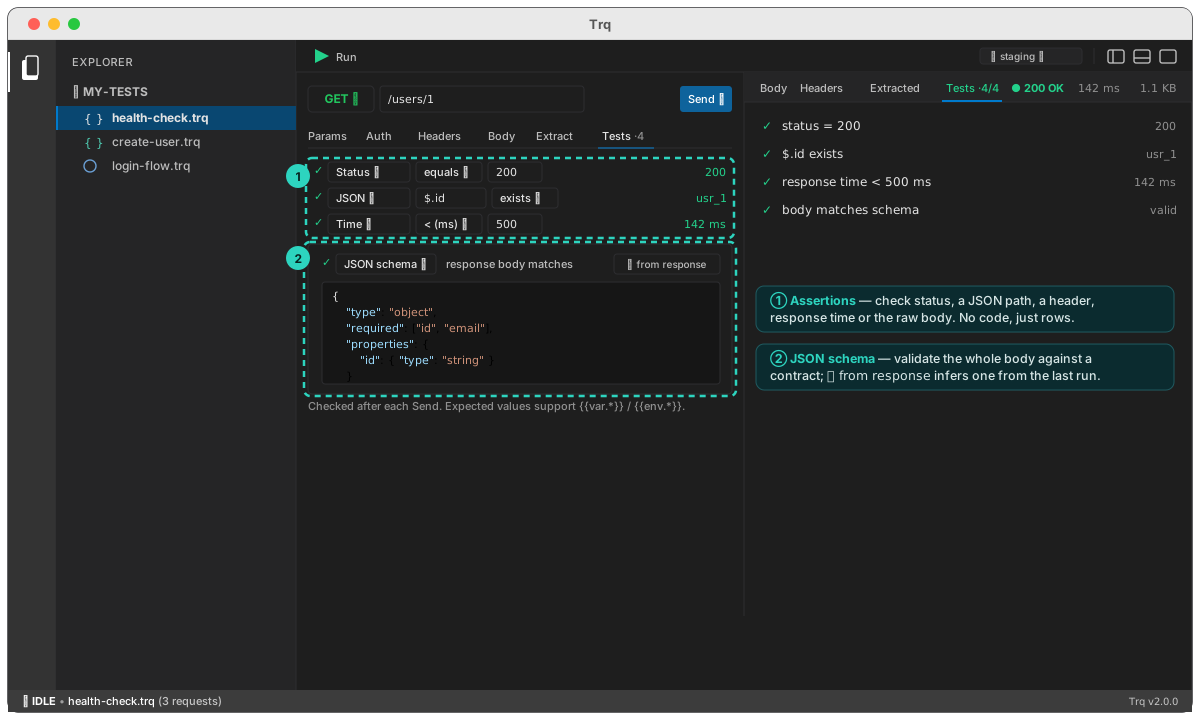
Anatomy of a row
Each assertion is a source, an operator, and (for most) an expected value:
| Source | Checks | Example |
|---|---|---|
| Status | the HTTP status code | equals 200 |
| JSON body | a value at a JSON path | $.id exists; $.plan equals pro |
| Header | a response header | Content-Type contains json |
| Response time | duration in ms | < 500 |
| Raw body | the whole body as text | contains "usr_"; matches /^\{/ |
| JSON schema | the whole body against a schema | (see below) |
Operators depend on the source — equals / not equals, contains / doesn't contain, exists / doesn't exist, < / >, is type, and matches /regex/. Expected values are templatable, so you can assert against a captured or environment value: $.userId equals {{var.userId}}.
Each row has an enable checkbox — disabled rows are skipped (not failed), handy while you iterate.
JSON Schema — contract testing
The JSON schema source validates the entire response body against a JSON Schema, so you assert the shape of a payload in one row instead of a dozen field checks. It's ideal for catching contract drift — a field that changed type, a key that went missing.
{
  "type": "object",
  "required": ["id", "email"],
  "properties": {
    "id":    { "type": "string" },
    "email": { "type": "string" },
    "roles": { "type": "array", "items": { "type": "string" } }
  }
}
The validator is built in (no external dependency) and supports the common keywords: type (including integer), enum, const, required, properties, items, minimum/maximum, minLength/maxLength, pattern, minItems/maxItems, additionalProperties, and allOf / anyOf / oneOf. On a mismatch the row's actual value names the first offending path (e.g. $.id: expected string, got integer).
Generate a schema from the response
Don't hand-write it. After a Send, click ⤒ from response on the schema row and Trq infers a starter schema from the last response — then trim it down to just the fields and constraints you want to lock in.
Where results show
- On the request, each row's dot turns ✓/✗ with the actual value.
- On the response, the Tests tab lists every check with a passed/total count.
- Across a Run, the Summary tallies assertions and lists failures first.
Next: go beyond declarative rows with pre/post scripts, then run the whole case and read the report.