
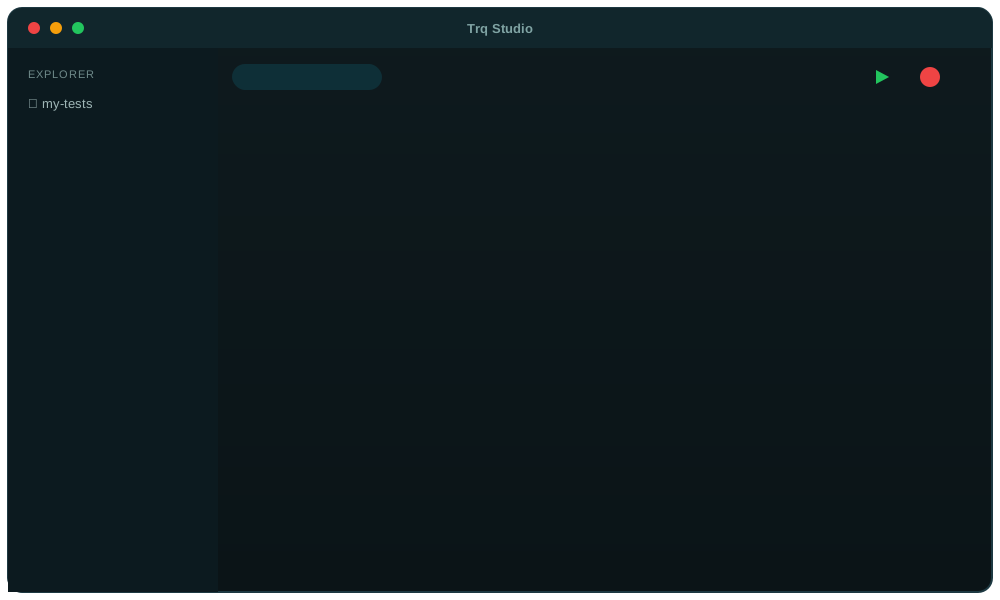
A full testing studio — not a recorder bolted on
Record, run, debug, and trust web, mobile & API tests — record-first, with the engine to make them hold up.
Record, don’t script
Perform the flow once — in a real, bundled browser or a live Android emulator. Trq captures every tap, keystroke, upload, and assertion — zero test code to write or maintain.
Native mobile, too
Record a real Android flow in a live emulator embedded in Trq — taps, typing, gestures, uploads — with the same self-healing steps and result panels as web.
Selectors that self-heal
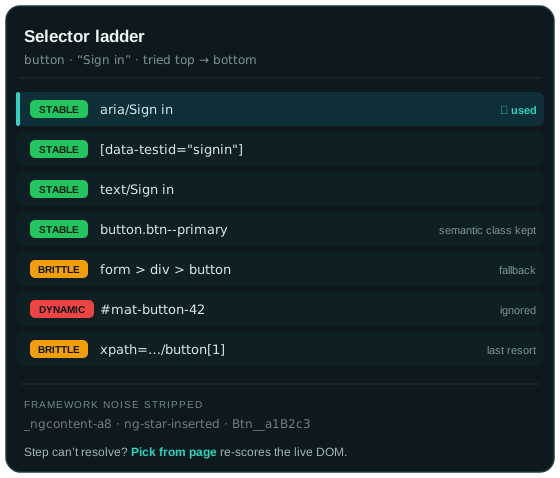
Every element is saved as a ranked ladder of selectors. Replay falls back automatically, and a failed step re-scores the live DOM so you fix it in a click.
Deterministic replay
Every run clears cookies, storage, and caches, then replays from step 1 — no leftover state, no flake, the same result on every machine.
Assertions & captures
Pick an element to assert text, value, or visibility — or capture a value into {{var.NAME}} and reuse it in later steps.
Reusable building blocks
Call one .trq from another, branch a shared prefix, resume to extend, or insert steps mid-flow — grow a suite without re-recording.
API testing built in
Build, send, and assert on HTTP requests — standalone cases with {{var}} chaining and JSON-Schema checks, or a request mid-flow. Runs in CI, no browser.
Network mocking
Snapshot API responses while recording and serve them back on replay — fast, offline-capable runs. Edit any response to test error states.
Selectors that survive redesigns
Brittle selectors are why recorded tests rot. Trq is built so a class rename or a re-ordered DOM doesn’t take your suite down with it.
- A ranked ladder, not one guessMost tools pin a step to a single selector — when the markup shifts, it breaks. Trq records eight ranked rungs (accessible name, test-ids, visible text, semantic class, scoped CSS, XPath) and resolves the first confident match, falling back as needed.
- Framework-awareAngular (
_ngcontent,ng-*), Material/CDK, ReactuseId(:r…:), and hashed CSS-module classes are filtered out — semantic BEM names are kept. - Fragility you can seeThe Inspector grades every rung stable / brittle / dynamic, so you spot fragile selectors before they bite.
- Self-heal on failureWhen a step can’t resolve, Trq re-scores candidates from the live DOM and “Pick from page” captures fresh selectors in one click.
Build tests you don’t rewrite
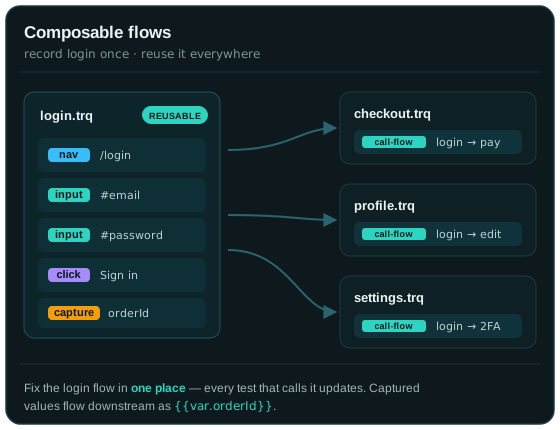
Tests share setup — login, navigate, seed data. Trq lets you record those once and reuse them, so maintenance stays linear as your suite grows.
- Composable flowsCall one
.trqfrom another (nested), so a login or setup flow lives in exactly one place — fix it once, every caller updates. - Branch, resume, insertFork a shared prefix into a new test, extend from the end, or record new steps in the middle — without re-recording the whole flow.
- Values that flowCapture from the page or extract from an API response into
{{var.NAME}}, then reuse it downstream;{{uuid}}& friends generate once per run. - Reusable setupViewport, locale, geolocation, fake camera/mic, permissions, and headers are saved per session and applied on every run.
Assert and capture, by pointing
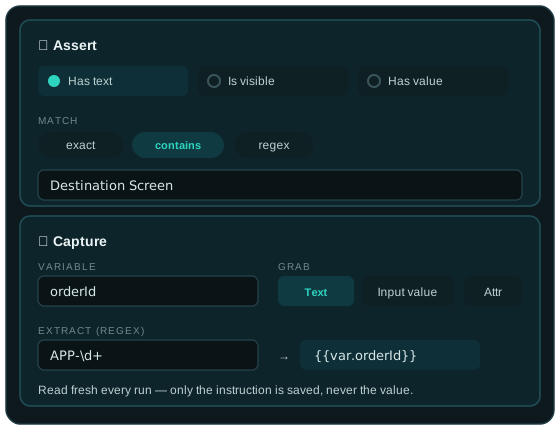
Check what matters and pull out the values you need — all by clicking elements on the page, no selectors to hand-write.
- Assert what you can seePick an element and check it’s visible, or that its text or value matches — no selector hunting, and it works inside same-origin iframes.
- Three match modesCompare exact, contains, or regex;
{{templates}}resolve before the check, so assertions can reference captured values. - Capture into variablesRead an element’s text, an input’s value, or any attribute into
{{var.NAME}}— with an optional regex to pull just the part you want. - Always currentOnly the instruction is saved (selector + kind), never the value — so it reflects each run’s real data.
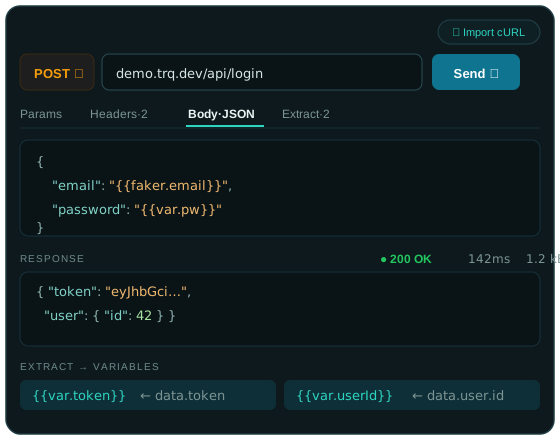
Test your API — standalone or in-flow
Build a request, Send it, and assert on the response — as a standalone case that runs in CI, or as a step inside a web or mobile flow. No browser, no CORS.
- Cases that chainBuild a whole test from many requests. Extract a value into
{{var.NAME}}and send it in the next request’s URL, headers, or body — login → create → verify, no code. - Assert, incl. JSON SchemaDeclarative checks on status, JSON paths, headers, and response time — or validate the whole body against a JSON Schema for contract testing (generate one from the response).
- A full request builder + cURLMethod, URL, params, headers, auth (Bearer / Basic / API key), and bodies (JSON / form / multipart / GraphQL) — all
{{templated}}. Paste a “Copy as cURL” and it fills in. - Runs anywhere, incl. CIServer-side (Node
fetch) — no browser, no CORS. Swap environments (dev / staging / prod) and replay headless from thetrqCLI, or fire a request mid-web-flow to seed data.
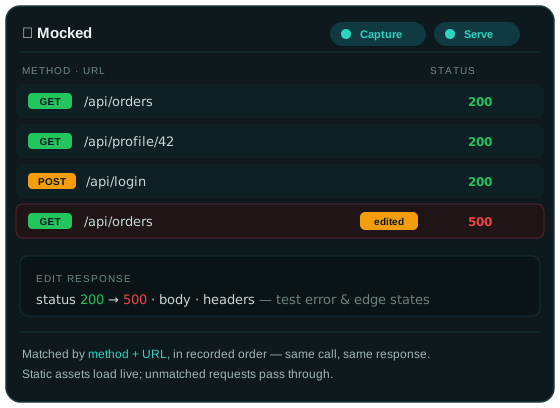
Mock the network, deterministically
Make replays fast and repeatable — and exercise error paths you can’t trigger on demand — by serving recorded responses.
- Record once, serve backSnapshot API responses while recording; replay serves them instead of hitting the backend — fast, offline-capable, deterministic runs.
- Ordered matchingMatched by method + URL in the order recorded, so a single gateway called many times replays the right response each time.
- Edit any responseChange the body, status, or headers — flip a
200to a500— to test error and edge states without touching the backend. - Hybrid by designOnly API calls are mocked; static assets load live and unmatched requests pass through to the real network.
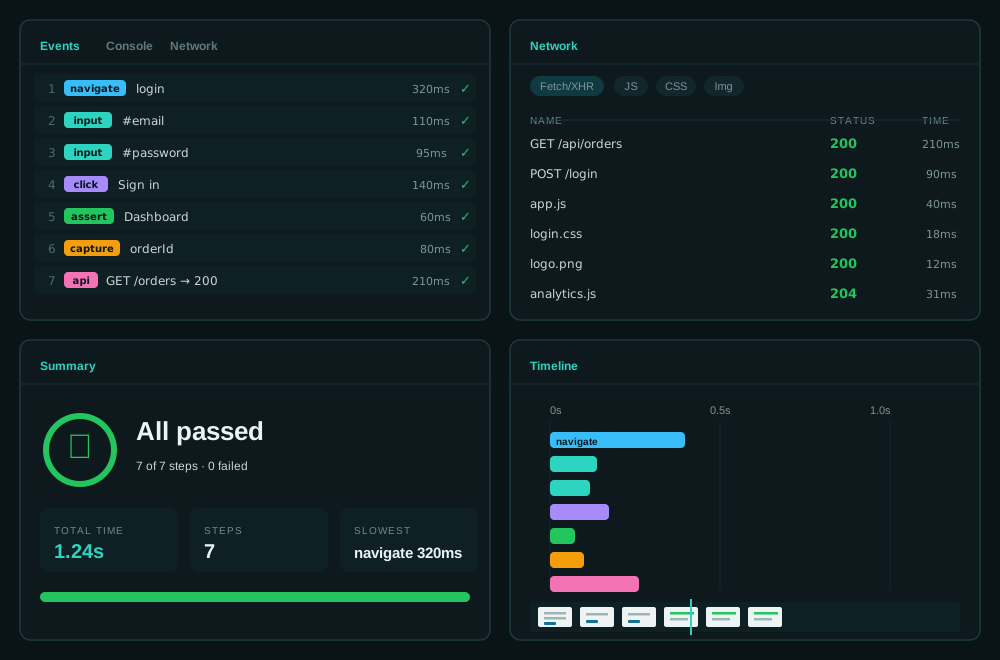
Inspect every run
After each replay the bottom panel fills with everything you need to understand — and debug — what happened.
- EventsEvery step with pass/fail and per-step timing. Double-click to edit a step, reorder its selector ladder, or re-pick an element from the live page.
- NetworkA familiar request list — filter by request type and search URLs, then open any request to inspect its headers, payload, response, and timing.
- SummaryPass/fail counts, total duration, the slowest step, and the failure screenshot if the run stopped — the at-a-glance health of the run.
- TimelineA scrubber over time-scaled step bars with a thumbnail of the page at each step — hover to preview, click to jump straight to that moment.
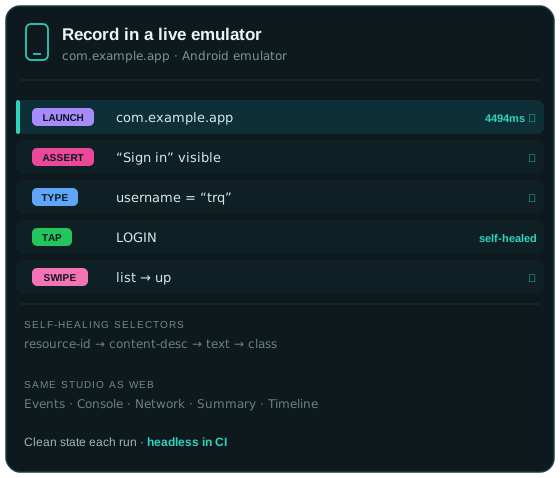
Automate native mobile — the same way
Record a real Android flow in a live emulator embedded right in Trq. Taps, typing, gestures, and uploads — captured as self-healing steps, replayed deterministically.
- Record in a live emulatorDrive an Android emulator embedded right in Trq — tap, type, swipe, long-press — and every action becomes a self-healing step.
- Selectors that self-healEach element is a ranked ladder (
resource-id → content-desc → text), so replay falls back automatically when one rung breaks. - The same studioThe same Events, Console (logcat), Network, Summary and Timeline panels, per-step screenshots, and one-file shareable report as web.
- Clean state, CI-readyClear app data and grant permissions before each run; capture and mock the network; replay headlessly, in parallel across multiple emulators.
Stop scripting tests. Start recording them.
Web, mobile, and API — one studio. Free, in early access — universal macOS build (Apple Silicon & Intel).